
Explore how we implement Microsoft Purview Data Loss Prevention (DLP) to gain better visibility into sensitive data activity, reduce data-sharing risks, and improve compliance across its Microsoft 365 environment.
Project overview:
The client is a U.S.-licensed insurance broker and administrator that provides student accident and health insurance programs for schools and educational institutions. As the organization expanded its cloud and digital collaboration environment, it needed better visibility and control over the data movement across endpoints, email, and cloud platforms. To address these challenges and strengthen data protection, Microsoft Purview DLP was implemented across the client’s Microsoft security ecosystem.
Challenges
- The client had limited visibility into how sensitive information was being shared across emails, cloud platforms, and user devices.
- Existing data protection measures were not fully equipped to support cloud collaboration and hybrid work environments.
- Data monitoring was spread across different systems, making it difficult for teams to track potential risks from a single place.
- Day-to-day collaboration across teams made it harder to control how sensitive information was being shared.
- Growing compliance and audit requirements made it difficult to manage monitoring, reporting, and policy enforcement efficiently.
Solution
Microsoft Purview Data Loss Prevention was implemented across the client’s Microsoft 365 environment to improve control over the sharing of sensitive information via email, cloud platforms, and employee devices. The focus was on strengthening data protection without interrupting day-to-day collaboration. The rollout began by identifying areas with a higher risk of sensitive information exposure. Policies were initially introduced in audit mode to understand how information was shared before broader enforcement was applied.
Controls were gradually extended across external email sharing, cloud uploads, removable storage devices, printing, and clipboard activity. This helped the client centralize monitoring and reporting while improving visibility into sensitive data activity across the organization.
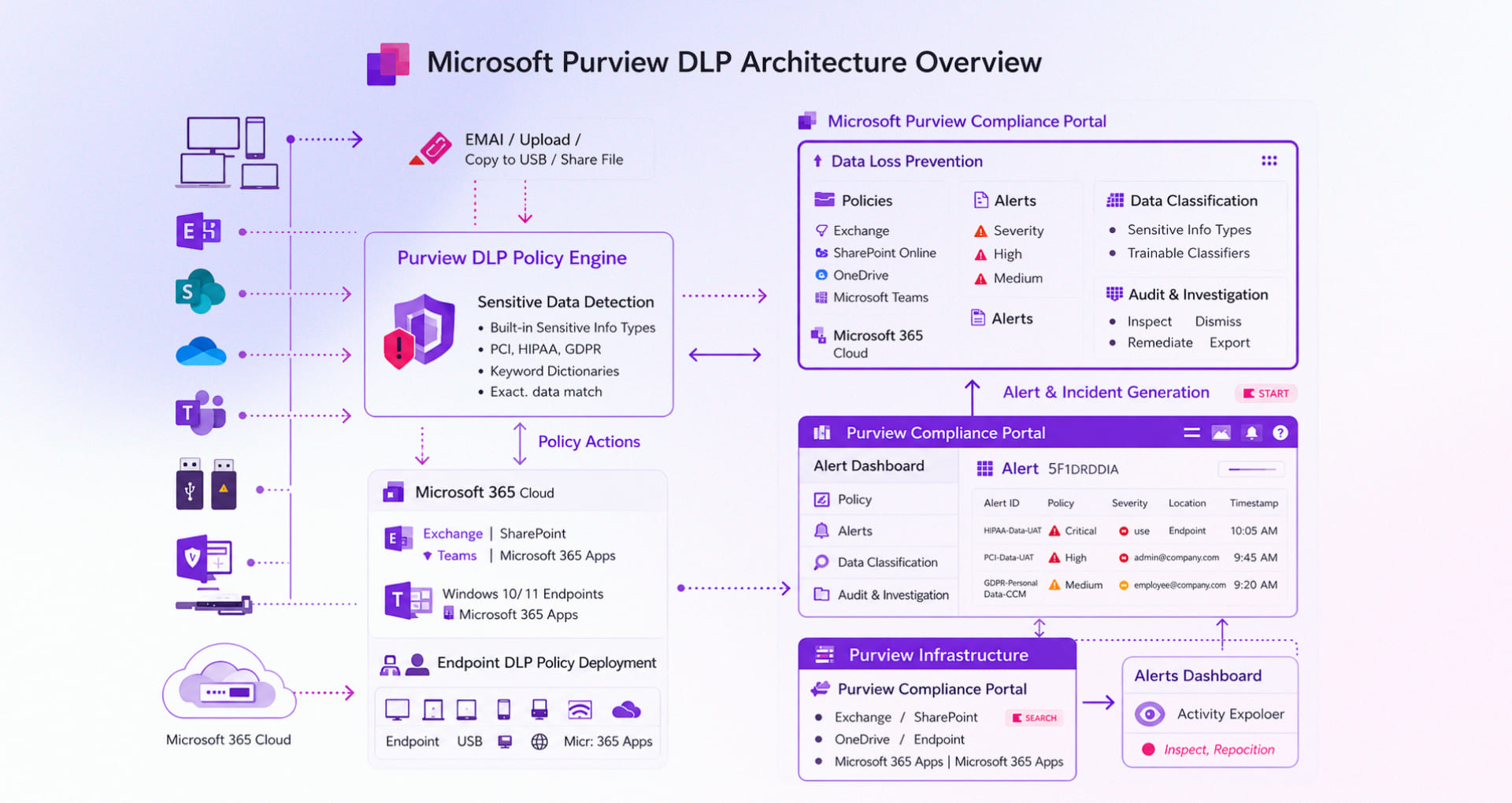
Broad Scope of Project
Centralized DLP Policy Implementation
Microsoft Purview Data Loss Prevention implementation took place to help the client better monitor and control how sensitive information was shared across Microsoft 365 services, employee devices, browsers, and cloud platforms. The solution allowed the client to define policies for sensitive data and apply actions such as user warnings, activity monitoring, policy tips, blocking specific actions, and triggering alerts when potential incidents were detected.
Microsoft 365 Data Protection
DLP controls were extended across key Microsoft 365 services, including Exchange Online, SharePoint, OneDrive, and Microsoft Teams. This helped the client monitor and control sensitive data sharing through emails, attachments, shared files, and collaboration channels.
Endpoint and Browser-Level Protection
Endpoint DLP capabilities were enabled to help the client manage how sensitive information was handled across employee devices and browsers. Controls were introduced to monitor and limit activities such as copying sensitive files to USB devices, printing confidential information, uploading files through browsers, and transferring sensitive content to unauthorized applications.
Identity and Device-Based Controls
Microsoft Entra ID and Microsoft Intune were integrated with the solution to strengthen identity, access, and endpoint compliance controls. This ensured that DLP (data loss prevention) policies were applied in alignment with user identity, device compliance, and organizational access policies.
Alerting, Reporting, and Compliance Visibility
Real-time alerts, incident reporting, and compliance dashboards were configured within Microsoft Purview to create a more unified view of sensitive data activity across the organization. This helped security and compliance teams identify policy violations faster, improve risk visibility, and respond to potential data exposure incidents with greater operational clarity.
Security Monitoring and Response Support
Microsoft Defender was used to improve visibility into endpoint and user activity across the organization’s digital environment. This helped the client strengthen security monitoring, investigate potential threats more effectively, and respond to incidents faster across critical business systems.
Benefits
- Improved visibility into how sensitive information was being shared across cloud platforms, employee devices, and collaboration tools.
- Helped reduce the risk of accidental data exposure through more controlled and consistent data-sharing practices.
- Strengthened data protection without affecting day-to-day collaboration and business operations.
- Enabled security and compliance teams to identify and respond to potential risks more quickly through centralized monitoring and alerts.
- Simplified compliance tracking and audit readiness with more centralized reporting and governance visibility.
Customer Profile
The client is a U.S.-based insurance provider offering student insurance programs and claims administration services for schools, colleges, and educational institutions.
Technology Stack
- Microsoft Purview DLP, Endpoint DLP
- Microsoft 365, Exchange Online, SharePoint, OneDrive, Microsoft Teams
- Microsoft Entra ID
- Microsoft Intune
- Microsoft Defender
- Microsoft Azure
Industry
Insurance Services