Imagine your CFO’s reaction when he learns your on-prem infrastructure costs $37,000–$55,000 a month. Now picture telling him you can cut that by ~37%(three-year cost of operations), make IT teams 53% more efficient, and reduce unplanned downtime by ~86%. That’s not a sales pitch. That’s what happens when enterprises stop debating cloud migration and start executing on-prem to Azure migration strategically.
Tech leaders no longer ask whether to migrate. The question has evolved! They now ask how to migrate from on prem to Azure profitably. If you’re still managing on-premises infrastructure, you know the pressure. Hardware refresh cycles arrive faster. Energy bills climb higher. Compliance demands multiply. Meanwhile, competitors move faster because they’ve freed themselves from infrastructure constraints.
This informative piece of content shows you exactly how to execute a predictable and profitable migration from on-premises to Azure cloud in 2026.
Why Azure Migration Matters Now: The Financial Reality?
On-premise to Azure Cloud Migration is a calculated move that redefines how your business thinks, builds, and grows. It allows you to shift your focus from server rooms to business ideas, speed, and possibilities. When revenue dips, your infrastructure costs drop proportionally. When opportunity strikes, you can scale instantly without procurement delays!
- And just to back this intuition with evidence, a 2024 IDC report points out that companies that took this leap achieved a remarkable 704% three-year ROI. This was driven by tangible gains, including 19.2% lower Azure capacity costs and a massive 77% reduction in unplanned downtime in Microsoft CDN.
- Forrester TEI on Azure PaaS modernization shows a 228% 3-year ROI and 15-month payback.
- Azure VMware Solution (2024) shows 298% ROI with payback under 6 months.
The compelling ROI numbers from major reports are not just marketing hype. They are the financial reality of smart cloud migration. But to effectively prove this value to executives, you must build a one-page ROI dashboard that makes sense to them. You can start with the current monthly infrastructure spend. Project Azure costs using realistic workload sizing and model your payback period honestly. Most businesses realize a full return on their Azure investment in just 12 to 18 months. But here’s the real kicker: proving ROI isn’t just about running cost comparisons. Smart teams track the savings no one sees on day one.
Consider:
- Security incidents that never happened
- Downtime you avoided
- Compliance penalties you never had to deal with
Add those invisible wins to your calculator and suddenly the business case becomes undeniable. For leadership, these numbers aren’t “nice-to-have”, they’re deal-makers.
Common Challenges in On-Premise to Azure Cloud Migration and How to Solve Them
No two Azure migrations look the same. Every enterprise has a unique data landscape, legacy systems, and operational procedures. What differentiates smooth transitions from stressful ones is the prep. Listed below are common pitfalls and practical tips to address them.
Application Complexity
Legacy systems come with baggage: outdated hardware dependencies, custom network configurations, and authentication protocols from 2010. Map out what each application needs before you move anything. Azure cloud migration gives you a solid start by mapping all your app and system connections. But not every application will move to the cloud as-is. Some need small tweaks while others may need a complete rebuild to work smoothly on Azure. If you’re unsure where to start or how to manage obsolete systems, fret not. We’ve compiled a step-by-step guide to help you migrate applications to Azure cloud without confusion or tech overload.
Security Risks
One misconfiguration creates a breach. Azure provides Security Center for threat monitoring, Policy for governance, and Active Directory for access control. Make sure they’re adequately configured from day one. Encrypt all information, whether it is in transit or at rest. And don’t skip security audits as they’re essential, and not optional.
Network Performance
Slow or unreliable connections hurt productivity. Azure ExpressRoute creates dedicated, fast links between your office and Azure. For smaller needs, VPN Gateway works well. Plan your network layout before migration to avoid slowdowns.
Budget Overruns
Cloud costs spiral when you provision more resources than needed or forget to monitor usage. Match resource sizes to actual requirements. Azure Cost Management tracks spending in real time. Reserved Instances cut costs for predictable workloads.
Service Interruptions
Large-scale migrations can knock systems offline. That’s a problem for 24/7 operations. It’s best to start small and move your non-critical tasks first just to test the waters and prove the process works. Once everything works well in testing, move in phases to reduce risk. Use tools like Azure Site Recovery, Data Factory, and Database Migration Service to transfer your data with minimal disruption and near-zero downtime.
Skills Shortages
Most IT teams lack deep Azure experience. Training takes time. Microsoft Learn offers resources or bring in partners who’ve handled migrations before. Clear communication across your organization matters. When people know why the change is happening and what you expect from them, the migration process becomes smooth. Clear communication removes confusion, builds trust and helps everyone adapt faster.
Performance Problems
Apps that run fine on physical servers may underperform in Azure without tuning. Cloud environments behave differently. Use Azure Monitor to track performance right after migration. Review the data and optimize continuously.
Recovery Gaps
Plan your backup and recovery strategy before anything goes wrong. Build Azure’s disaster-recovery tools into your migration plan from day one. Test your recovery steps while everything runs smoothly so you’re truly ready when an incident happens.
Each challenge has a solution. The key is to prepare early instead of scrambling later.
On-Premise to Azure Migration Step-by-Step Process
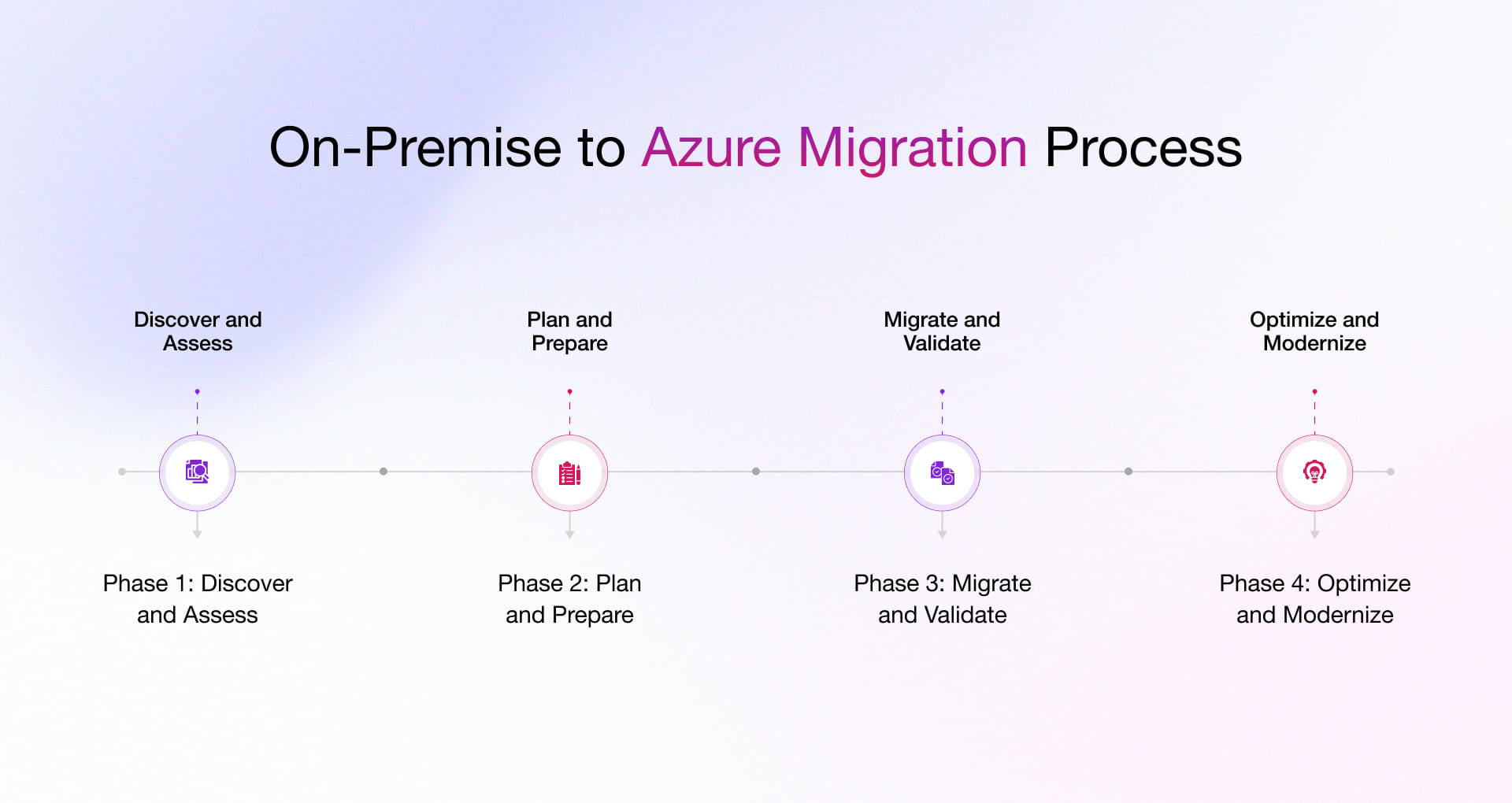
Migration from on premise to Azure cloud is a smart way to boost flexibility, cut costs, and stay secure. But to make the most of it, you need a clear plan. This guide breaks down the process in simple steps, so your teams can migrate smoothly, avoid disruption, and harness the full potential of the cloud.
Phase 1: Discover and Assess
- Use Azure Migrate to inventory servers, apps, and databases across VMware, Hyper-V, physical, and other clouds. It collects configuration and performance data to support right-sizing and dependency mapping.
- Estimate costs and right-size early. Organizations that act on Azure Advisor recommendations report about 20% optimization in ongoing Azure spend.
- Prioritize risky or costly workloads first, such as unsupported operating systems, to remove security and compliance exposure. (Use your discovery findings to justify priorities.)
- Publish a readiness report that summarizes inventory, dependencies, projected Azure costs, and migration risk so stakeholders can make informed decisions.
Phase 2: Plan and Prepare
- Choose the right approach: Rehost for speed, replatform to balance speed and modernization, refactor to unlock full cloud benefits. (Microsoft’s migration guidance supports selecting a mix by workload.)
- Design a landing zone for network, security, identity, governance, and cost controls before any cutover. Teams that skip upfront governance frequently overspend. In a 2023–2024 Gartner survey, 69% of IT leaders reported cloud budget overruns.
- Enable tagging and cost allocation so finance can track usage and enforce budgets through Azure Cost Management and policy.
- Create and rehearse a cutover plan with clear rollback steps. Practice on non-production systems to reduce go-live risk.
Phase 3: Migrate and Validate
- Use Azure Site Recovery to replicate workloads and run test failovers that validate recovery without downtime or impact to production replication. This allows safe pilots before cutover.
- Move databases with Azure Database Migration Service to achieve minimal downtime for SQL Server, MySQL, PostgreSQL, and other supported engines.
- Pilot first, then scale. Start with low-risk workloads that mirror production patterns to surface integration, auth, and performance issues early.
- Validate after cutover. Confirm performance against baselines, test authentication and failover, and monitor under production load before sign-off.
Phase 4: Optimize and Modernize
- Use Azure Cost Management and Billing for budgets, forecasts, and anomaly detection. Forrester reported 20% to 34% reduction in Azure spend after addressing inefficiencies.
- Clean up routinely. Shut down idle dev and test, right-size oversized instances, and remove orphaned resources to lock in savings.
- Modernize over time. Adopt AKS, App Service, and managed PaaS where it improves resilience and reduces operations. Azure PaaS shows strong ROI when moving beyond lift-and-shift.
At Rishabh Software, we know migrations can feel complex. We guide your team from discovery to optimization, select the right tools for your environment, automate the steps that slow you down, and validate every cutover. Our goal is a smooth, low-risk move to Azure that reduces costs and improves resilience, with clear communication at every step.
On-Premise to Azure Migration Tools
Microsoft provides a complete and integrated set of tools that cover all the essential steps of Azure migration which will allow you to evaluate, plan, and transfer your workloads in a safe and fast manner while also cutting down on the complexity and minimizing the downtime.
- Azure Migrate – A centralized hub for discovering, assessing, and migrating on-premises servers, databases, web apps, and virtual desktops to Azure. Supports VMware, Hyper-V, and physical servers.
- Azure Database Migration Service (DMS) – Assists in transferring databases such as SQL Server, MySQL, and PostgreSQL to Azure with very little downtime.
- Azure Site Recovery – Creates copies of virtual machines or physical servers on-premises in Azure, which allows disaster recovery and migration with almost no downtime.
- Azure Data Factory – Manages and automates data movement and reshaping processes from on-premises or other cloud resources to Azure.
- SQL Server Migration Assistant (SSMA) – Takes care of the evaluation, schema conversion, and data migration of databases to Azure SQL through automation.
- AzCopy – A command-based utility that offers a quick way to transfer bulk data to Azure Blob Storage.
- Azure Storage Mover – Effectively facilitates the transfer of file shares to Azure Files while maintaining access control.
- Azure Data Box – A physical device way of transferring very large datasets securely when network transfer’s not an option.
Moving to Azure doesn’t have to be stressful. As your partner, we take the guesswork out of the process. We’ll pick the right tools, automate the tough parts, and make sure your move is smooth and low-risk. We use our experience to help you save money, skip the common mistakes, and quickly unbolt the full power of cloud. If you need expert guidance, explore our cloud migration consulting services designed for enterprise-scale migrations.
Proven Results: On-Premise to Azure Cloud Migration Case Studies
Ready to see the proof? Migrating to Azure delivers measurable results. These case studies focus on enterprises that completed major migrations in 2024 or 2025 and reported improvements in every aspect: operational efficiency, system uptime, data security and cost savings.
| Company | Industry | Migration Overview | Key Benefits |
| Fortune Brands Innovations | Consumer Goods | Migrated on-premises assets to Azure, unified brands under Microsoft Power Pages and Dynamics 365 | Streamlined customer experience; improved operational efficiency; enabled AI innovation |
| Solv | Healthcare | Moved to Dynamics 365 Business Central on Azure, automating financial workflows | Reduced clerical errors by 98%; saved 40 man-hours monthly; enhanced financial controls |
| Syensqo.AI | Technology | Developed SyGPT chatbot using Azure OpenAI Service after cloud migration | Accelerated AI delivery harnessing scalable Azure AI infrastructure |
Execute Your On-Premise to Azure Cloud Migration with Rishabh Software Without Risk, Downtime, or Cost Overruns
Migrating to Azure is a complex undertaking. It calls for a strategic approach, technical expertise, and smooth execution. Rishabh Software brings years of experience managing swift and successful Azure migrations.
Why Rishabh Software?
- From readiness assessments to post-migration optimization, we manage every phase of your migration.
- We align your technical approach with business goals, ensuring early wins and a smooth transition for complex workloads.
- As a certified Microsoft solution partner, we provide access to FastTrack support and Azure credits, optimizing costs and accelerating migration.
- Our experience helps you avoid costly mistakes. We help you move beyond infrastructure challenges to realize the full potential of the cloud. Our approach ensures cost savings, enhanced agility, and improved business continuity.
Partner with us to execute your Azure migration quickly, efficiently, and strategically. Our Microsoft Azure cloud consulting services ensures a smooth transition with minimal disruption and maximum value.
On-Premise to Azure Migration FAQs
Q: How long does an Azure migration take?
A: Timelines depend on workload complexity. Simple lift-and-shift migrations can take weeks, while modernization or hybrid projects may run 6–12 months.
Q: What ROI can businesses expect from migrating to Azure?
A: Most businesses report payback within 12–18 months. According to IDC and Forrester studies, Azure migrations deliver an average ROI between 228% and 391% over three years.
Q: How can on prem to Azure migration help reduce operational costs?
A: Azure converts fixed capital expenses into flexible operating costs and offers cost-optimization tools like Azure Advisor, Cost Management, and Reserved Instances that drive sustained savings. Learn how to optimize your Azure costs and save millions. Download the Azure Cost Optimization: Strategic Insights for Executives eBook now and get expert strategies for cutting costs.