Note: Formerly Azure AI Foundry. Microsoft renamed the platform to Microsoft Foundry in 2026. Microsoft Foundry is Microsoft’s unified platform for building, deploying, evaluating and governing AI applications and agents. It builds on capabilities previously associated with Azure AI Foundry.
Most businesses are still figuring out AI agents. A 2026 Deloitte survey of 501 US leaders found that 42% have either tested or deployed AI agents, but only 15% have scaled multi-agent systems across the business.
Most companies struggle to turn a pilot into a production system because they are built for very different environments. A pilot has to work in a demo, against a curated dataset, with someone on hand to fill in the gaps. A production system has to work every day, against a massive volume of mixed data, with no one to explain the gaps.
Dashboards and copilots help you understand what’s happening. Goal-driven agents get things done. Give a goal-driven agent a clear business outcome, and it will extract the data, access the right tools, make decisions, and push the work forward with only limited human intervention.
This guide is for leaders who have moved beyond the “can we build an agent?” dilemma. The tougher questions are:
- Which processes are actually ready for autonomy?
- How do you keep an agent safe and accountable once it’s live?
- How do you prove real outcomes instead of activity?
This blog covers Microsoft Foundry agent development in plain terms: what it takes to build enterprise-ready agents, and where they can make the biggest impact on your business. We will also look at why so many agent pilots never reach production, and what it actually takes to go from idea to a deployed solution with Foundry Agent Service.
What is Microsoft Foundry (Azure AI Foundry) and Why Does It Matter for Agents?
You have faced this before. The demo works great until someone asks about access control, what happens when a tool call fails, or how to audit what the agent did last Tuesday. Suddenly you are not building an agent anymore. You are building an entire platform just to support one use case.
Microsoft Foundry, formerly Azure AI Foundry, stops you from rebuilding that foundation. It provides a model catalog, tool orchestration, access control, and monitoring already built in.
Agents need more than chat. Depending on the use case, agents may need to maintain conversation state, access historical context, analyze live data and follow business rules. Microsoft Foundry provides that foundation and the runtime that keeps agents running is Foundry Agent Service.
What is Microsoft Foundry Agent Service?
Building an agent is quick but running it reliably in production is not. Agent Service handles the runtime so your team can focus on behavior.
You define:
- Agent instructions, goals and guardrails
- The model from Foundry’s catalog
- Supported tools: web search, file search, code interpreter, custom functions, OpenAPI, MCP connectors and A2A agent calls
Foundry handles:
- Hosting, sessions and tool orchestration
- Scaling, tracing and security
You can build Prompt Agents or Hosted Agents directly in the portal or SDK. If you already have your own containerized agent, you can bring that too, as long as it’s built to meet Foundry’s runtime requirements.
What Makes Azure AI Foundry Agents Enterprise-Ready
Microsoft Foundry hands you a managed runtime for building, deploying and governing agents. You don’t have to stitch together a model API, a vector store, and the orchestration layer from scratch. It is similar to building an entire assembly line using raw parts versus renting factory space that already has power, safety systems and a loading dock. You still design what gets built. You just don’t have to build the factory first.
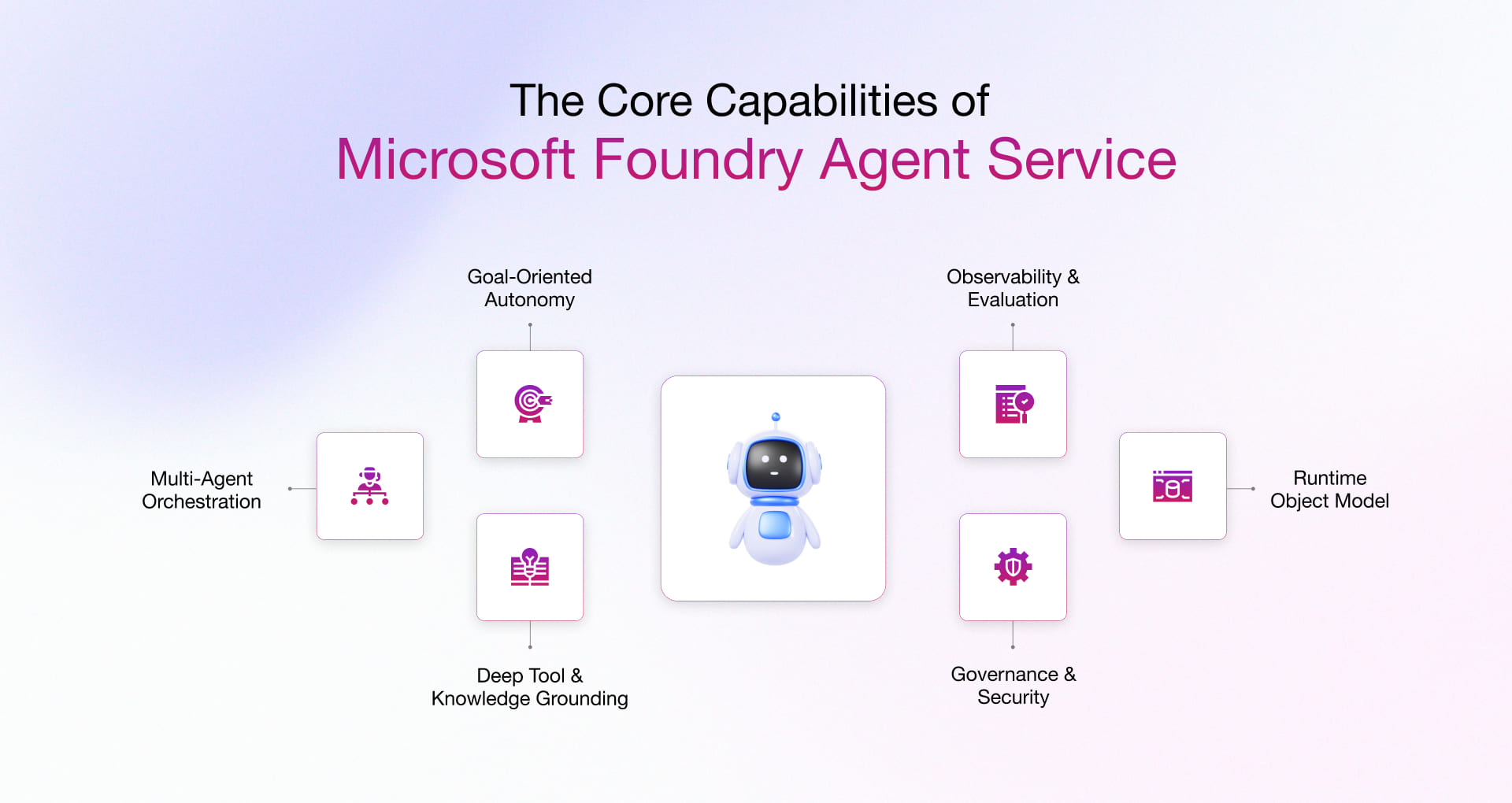
The key capabilities of Microsoft Foundry Agent Service for production-ready AI agents include:
1. Goal-oriented autonomy
Agents work toward a defined goal and can adapt their actions as conditions change, rather than following a predetermined sequence of steps. A traditional automation script breaks when reality deviates from what it was designed to handle. An agent, on the other hand, can assess the situation and adjust its approach to stay on course.
2. Multi-agent orchestration
A2A patterns let agents coordinate across departments, with explicit auth and clean call-and-response semantics. That means you can automate a process spanning finance, ops, and customer service, instead of just one task in one system.
3. Deep tool and knowledge grounding
Native connectors reach Microsoft 365, Fabric, and SharePoint plus Azure AI Search, Bing grounding, Code Interpreter, Function Calling, OpenAPI and MCP. Azure AI Foundry also exposes a cloud-hosted MCP server and catalog entries like Azure DevOps and Logic Apps. That means your agents pull real, current data from the systems you already run, instead of guessing from what they learned in training.
4. Observability and evaluation
Foundry provides tracing, metrics and evaluation capabilities that help teams understand agent execution, diagnose failures and measure performance. It also supports evaluation and optimization workflows that help teams improve instructions, tool usage and agent behavior over time. This reduces the amount of custom infrastructure teams need to build around the agent runtime.
5. Runtime object model
Agents, conversations, and responses aren’t one-off API calls that vanish the second they’re done. Foundry treats them as real, persistent objects. That’s the difference between an agent that remembers the conversation it’s in the middle of and one that forgets everything the moment you ask it something else.
6. Governance and security
Private endpoints, role-based access control, content filtering and compliance controls come built in. On top of that, Foundry lets you define exactly what an agent is allowed to do, then test those rules against a live agent with real conversations, single-turn and multi-turn, to see whether the controls deliver before you trust the agent with production data.
None of this is optional if you’re planning to run agents against production data. It’s also not enough on its own. The platform is the factory floor. What you build on it decides whether the agent ships or joins the pile of demos nobody revisits.
What are the Best Use Cases for Microsoft Foundry Agents?
Agents aren’t the best fit for every workload. The ones that deliver ROI fastest usually have a clear objective, a path that needs real judgment calls and enough volume to actually move the needle. If a task is as trivial as a static form fill or under-specified like an open-ended strategy, then an agent is the wrong idea. That leaves you with a limited list of processes where agents win. These processes need to be structured enough to automate, complex enough to need reasoning and frequent enough to justify the investment.
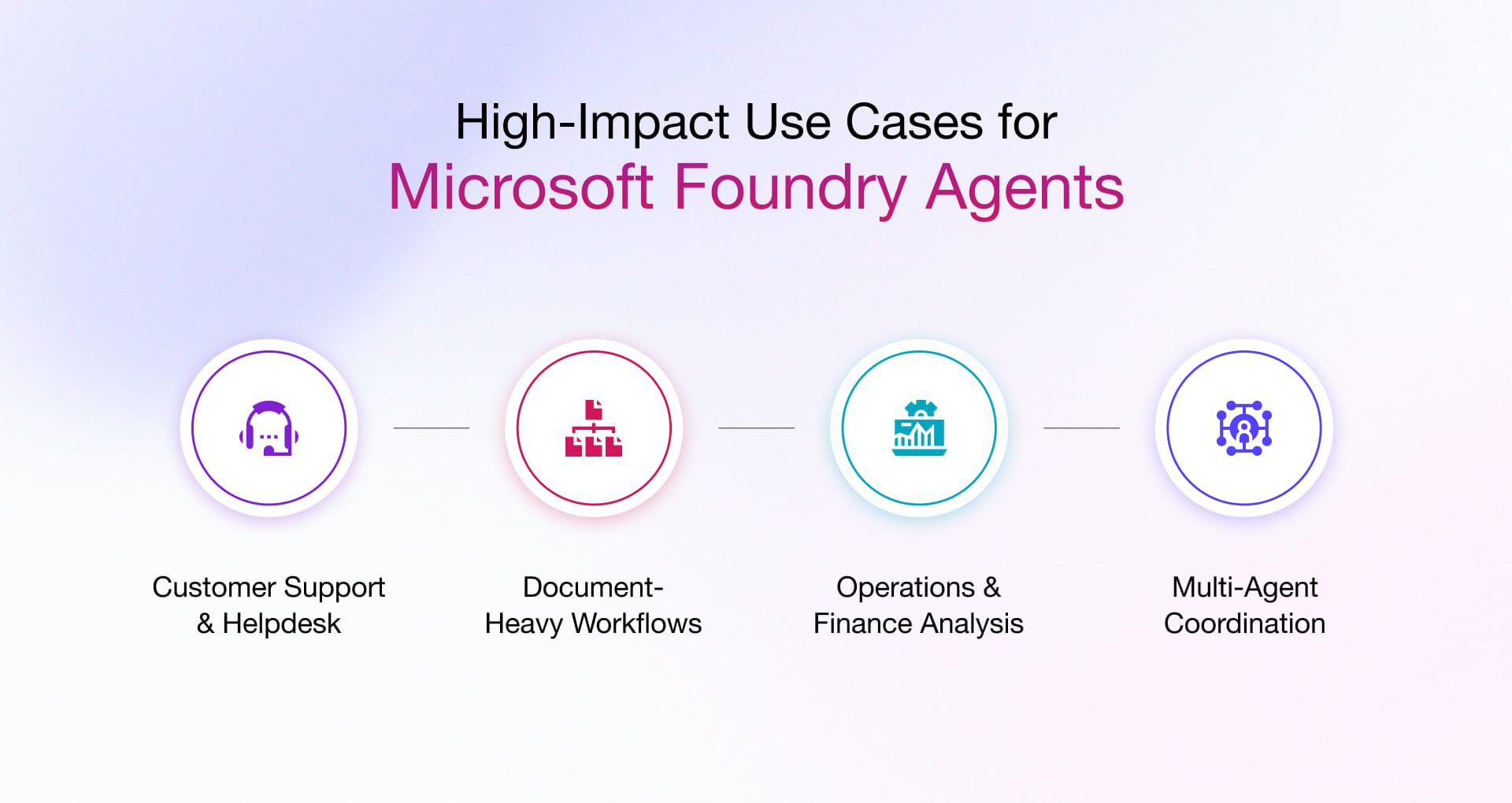
1. Customer support and helpdesk
Agents can interpret support requests, search knowledge sources, troubleshoot issues, and draft or execute resolutions. They can also escalate exceptions to a human with the relevant context.
2. Document-heavy workflows
Agents can process claims, invoices, contracts, and compliance documents, extract information, check it against business rules, and flag exceptions for review.
3. Operations and financial analysis
Agents can query Microsoft Fabric or Power BI data, investigate anomalies, answer business questions, and trigger approved actions instead of leaving teams to interpret dashboards manually.
4. Multi-agent workflows
Complex processes can be split across specialized agents for tasks such as intake, validation, decision-making, execution, and audit. This is useful when workflows span multiple systems, teams, or approval stages.
Why Do Most AI Agent Pilots Fail to Reach Production?
Agent pilots fail because teams skip the data foundation, governance, identity controls, observability and cost systems required for scale. Common breakdowns include:
Data grounding and tool-integration gaps
- Agents see only part of the enterprise picture. They succeed in demos and then fail on real requests that cross systems.
- Schema drift creates silent failures. Data models change while agents still rely on outdated assumptions. Unindexed content compounds the problem.
- Teams wire tool integrations for happy paths only. Production demands robust error handling, retries, timeouts, and idempotency across many tools. RAG alone may be insufficient when agents need to query transactional systems or perform structured operations against production data.
Missing governance, identity, and monitoring
- Agents often run under service accounts with excessive permissions and no clear owner.
- Logs show only the service account. They hide the human who started the request and the reasoning chain behind each decision.
- Agents access growing numbers of MCP servers and APIs with different permission models. This expands the attack surface faster than policy can keep up.
- Agents produce different outputs for similar inputs as context and models change. Teams rarely detect this behavioral drift because continuous monitoring is missing.
- High-risk actions lack enforced boundaries. Sensitive operations lack approval workflows. Agents have no automated escalation when confidence drops.
Why teams stall between prototype and scale
- Teams lack observability. Without execution traces that capture every tool call, memory operation, and decision, they cannot debug failures or prove compliance.
- Agents stuck in retry loops burn budget. Production requires hard spending caps, exponential backoff, and cost alerts.
- Uncertain agents need clear escalation paths. They must pause and request human input when confidence drops, sensitive data appears, or quota runs out.
- No one owns agent behavior, data access, or incident response. Security, data, and business teams each assume someone else is watching.
Production needs engineered systems with clear ownership, robust boundaries and reliable failure handling. That’s exactly where we can make the difference!
Why Partner with Rishabh Software for Azure AI Foundry Agent Development
Rishabh Software is a Microsoft Solutions Partner for Data & AI (Azure), with production AI and data systems running for clients across FinTech, AdTech, HealthTech, and digital manufacturing.
Full lifecycle delivery
We move from discovery through a focused 2–6 week pilot to full production deployment, complete with monitoring and knowledge transfer. Delivery runs through our Microsoft Data & AI Services practice, so the same team and the same governance standards stay with the project from the first meeting to go-live. No hand-offs. No gaps.
Governance-first architecture
Anyone can launch an agent in the Foundry portal. The difference is the identity model, access controls, audit trails and safety boundaries that protect production data. We design those layers first. Take a look at our AI Agent Development Services and Generative AI Development work to learn how we put governance in place before the agent ever reaches live systems.
Native Microsoft stack integration
Entra, Microsoft 365, Fabric, and Logic Apps are core to how we work. With more than 15 years as a Microsoft technology partner, we integrate agents directly into the systems your teams already use and trust, without forcing new platforms or workarounds.
Fixed-scope pilots that accelerate time to value
We bring reusable frameworks from completed client work, including an ESG compliance AI/ML platform delivered for a European FinTech firm. This shortens the path from idea to measurable impact. Pilots stay tightly scoped, time-boxed and focused on clear business outcomes.
Our Azure cloud consultants bring the expertise and strategy to identify two or three high-ROI agent opportunities across your existing Azure and Fabric environment. Book a strategy call with us and leave with a clear view of where autonomy can start safely.
FAQs
Q: Is Azure AI Foundry now called Microsoft Foundry?
A: Yes. In 2026 Microsoft rebranded Azure AI Foundry to Microsoft Foundry to unify its AI platform strategy. The underlying capabilities, Agent Service, the model catalog, orchestration and governance tools are still in place; only the name has changed.
Q: Is Microsoft Foundry agent development only for large enterprises?
A: No. Usage-based pricing and managed infrastructure mean mid-market teams can run a scoped pilot without the upfront platform investment a self-hosted stack would require. The limiting factor is usually process readiness, not company size.
Q: How long does it take to build a production-ready agent on Microsoft Foundry?
A: A well-scoped pilot, one process, clear success criteria, typically runs 2–6 weeks. Getting from pilot to full production, with governance, monitoring, and evaluation pipelines in place, adds several more weeks depending on how many systems the agent needs to touch.
Q: Can Foundry agents connect to our existing data and legacy systems, and what’s the hardest part of doing it right?
A: Yes. Connectors, APIs, and Model Context Protocol integrations handle the connections. The real challenge isn’t wiring the systems together. It’s making sure the agent only sees what each user is authorized to access and view. That requires deliberate design of your indexing and access-filtering layer, not just a working retrieval pipeline.
Q: What’s the difference between Microsoft Foundry and Foundry Agent Service?
A: Foundry is the full platform. Think of it as the workshop: models, data storage, safety checks, monitoring, all in one place. Foundry Agent Service is one tool inside that workshop. Its job is to run your agents: handle the back-and-forth, call the right tools, pull the right data, complete multi-step tasks.
Microsoft Foundry is the broader AI application and agent platform, while Foundry Agent Service provides the managed runtime and capabilities for building, deploying, scaling and operating agents. If you’re deciding whether to build agents at all, you’re looking at Foundry. If you’re deciding how an agent actually gets work done, you’re looking at Agent Service.
Q: What’s the difference between Microsoft Foundry Agent Service and Copilot Studio?
A: Copilot Studio is designed for low-code agent development and business-led automation, while Foundry Agent Service is better suited to engineering-led scenarios requiring deeper code-level control, custom integrations, specialized orchestration and broader application architecture.
Copilot Studio is best for low-code, business-led agents and simple Microsoft 365/Teams experiences, while Foundry Agent Service is better for engineering-led, complex agents that require code-level control, custom integrations, multi-agent orchestration, and integration across enterprise systems.
Q: What does a Microsoft Foundry engagement with Rishabh Software look like and cost?
A: Engagements start with a discovery phase to identify and scope one or two high-ROI processes. This is followed by a fixed-scope pilot. The cost typically depends on process complexity and the number of systems the agent needs to integrate with. Scheduling a strategy call with us is the fastest way to get a real estimate against your specific use case and business goals.