
Take a typical enterprise: It’s 2 a.m. The head of data at a global manufacturer just sent another frustrated Slack. Factory sensors are flooding out real-time data, but the old legacy systems can’t handle it. So, the AI agents optimizing inventory and production are stuck with stale, inconsistent information. The consequence? Delays, bad decisions, and rising costs.
In 2026, real-time data is essential. Your analytics, ML models and AI agents only work if they get fresh, reliable data. That’s why a well-designed modern cloud data architecture has become a business necessity rather than a technology upgrade. A successful modern data architecture keeps data trusted, governed and accessible while giving each layer enough flexibility to scale, integrate and support batch, real-time, analytics and AI workloads. On Azure, that means creating a clean, well-built data ecosystem that cuts costs, removes technical debt and fits smoothly into your existing apps.
This guide lays out the real tradeoffs between Azure’s main architecture patterns, walks through the four core layers of Azure modern data architecture, shows how agentic AI is changing what data platforms must deliver and provides a practical phased roadmap. It also explains how Rishabh Software helps enterprises get this right without costly trial-and-error.
Lakehouse, Data Mesh and Data Fabric: Understanding Their Roles in Modern Data Architecture
Many architecture discussions jump straight to tools but before choosing technologies, it helps to understand the broader modern enterprise data architecture strategy that aligns data, governance, analytics and AI across the board. The right choice depends more on your business structure than on any specific technology stack.
Worth saying upfront: these aren’t three competing options where you pick one and move on.
- A Lakehouse is primarily a data and analytics architecture pattern.
- Data Mesh is primarily an organizational model built around domain ownership.
- Data Fabric centers on metadata, integration, governance, and automation.
Most enterprises end up combining pieces of all three, shaped around how their teams actually work.
Lakehouse (Databricks or Synapse on Delta Lake)
This fits best when one central team owns the data and needs both raw storage and strong querying in one place. Ideal for retailers with a single analytics group or mid-sized companies without scattered teams arguing over data ownership.
Data Mesh
This turns the model upside down. Each business unit owns its own data products, publishes them, and others consume them through clear agreements. It suits large, decentralized companies where teams like finance and supply chain would never share one common model. It needs strong organizational maturity more than advanced tech. Most failures happen because no one could agree on who owns what.
Data Fabric (centered on Microsoft Purview)
This approach puts governance and metadata at the heart of everything. Healthcare networks and banks often pick it when they need solid audit trails and data lineage. You lose a bit of flexibility, but you can quickly answer, “where did this number come from?” instead of spending days tracking it down.
Hybrid Models and Decision Matrix
Real-world enterprise estates rarely fit into pure academic models. Large enterprise teams frequently deploy Hybrid Architectures such as a federated Data Mesh where each autonomous business domain internally employs a highly scalable Data Lakehouse.
These approaches represent some of the most common modern data architecture examples used by enterprises adopting Azure.
| Pattern | Best For | Key Azure Services |
| Lakehouse | Central team, unified analytics + storage | Databricks, Synapse, Delta Lake |
| Data Mesh | Decentralized orgs, domain-owned data products | Azure API Management, Purview |
| Data Fabric | Governance-first, regulated industries | Microsoft Purview, Synapse |
| Hybrid | Large enterprises with mixed workload needs | All of the above, composed deliberately |
Key Modern Data Architecture Components
While implementation strategies vary, most Azure platforms are built around a consistent set of Azure modern data architecture principles. These include scalability, governance, interoperability and support for both analytics and AI workloads.
1. Unified Data Lake (ADLS Gen2 / Fabric OneLake)
Many Azure data architectures use a unified or logically integrated storage foundation, though the exact design still depends on your workloads and platform choices. ADLS Gen2 gives you hierarchical structure, proper access controls, and cheap tiering. Fabric’s OneLake sits on top with shortcuts, creating one logical view across your data without copying anything. The real question is whether you want Fabric’s workspace and governance layer on your existing lake.
2. Medallion Architecture (Bronze, Silver, Gold)
This is the go-to pattern for organizing data in the lake. Raw data lands in Bronze and stays immutable. You clean and enrich it into Silver, then shape and aggregate it into business-ready Gold tables. Medallion architecture is a widely adopted pattern for organizing data into progressive quality layers, particularly for lake and lakehouse implementations and it bakes in quality checks and traceable lineage along the way.
3. Delta Lake Format
Delta Lake makes Medallion practical. It brings ACID transactions, schema enforcement, and time travel to your data lake files. Delta Lake is widely supported across Azure analytics platforms, including Azure Databricks and selected Azure Synapse workloads.
4. Semantic Layer
This turns raw tables into business-friendly metrics and dimensions. Power BI/Fabric semantic models or Synapse views usually handle it, with Azure Analysis Services still an option for specific legacy or enterprise-scale scenarios.
5. Metadata and Lineage (Microsoft Purview)
Microsoft Purview can scan supported enterprise data sources to catalog metadata, classify sensitive information, and capture lineage where supported, from source systems through to reports and AI prompts. It makes governance visible and integrates with enforcement, though actual access controls still rely on RBAC, ACLs, and private endpoints.
6. Orchestration Engine
Azure Data Factory handles scheduling, dependencies, and retries for most pipelines. For ML, Databricks MLflow covers experiments, model versioning, and deployment. Which tools you lean on, and how far you extend them, comes down to your workload requirements rather than a one-size-fits-all pairing.
7. Vector Search Index (Azure AI Search)
For AI use cases involving semantic retrieval over enterprise documents or unstructured content, vector or hybrid search can provide an effective retrieval layer. Azure AI Search handles hybrid search over structured and unstructured data. It gives your Gold layer a dedicated path for AI retrieval, enabling proper RAG instead of hallucinated answers from stale data.
8. Real-Time Streaming Backbone
Event Hubs and IoT Hub manage ingestion. Stream Analytics or Databricks Structured Streaming process it downstream. IoT Hub adds device management and bidirectional comms that Event Hubs lacks.
The 8 Core Layers of Azure Modern Data Architecture
Here’s how the core layers work in real enterprise settings. Together, these layers form a practical modern data architecture diagram that enterprises can use as a blueprint for implementation.
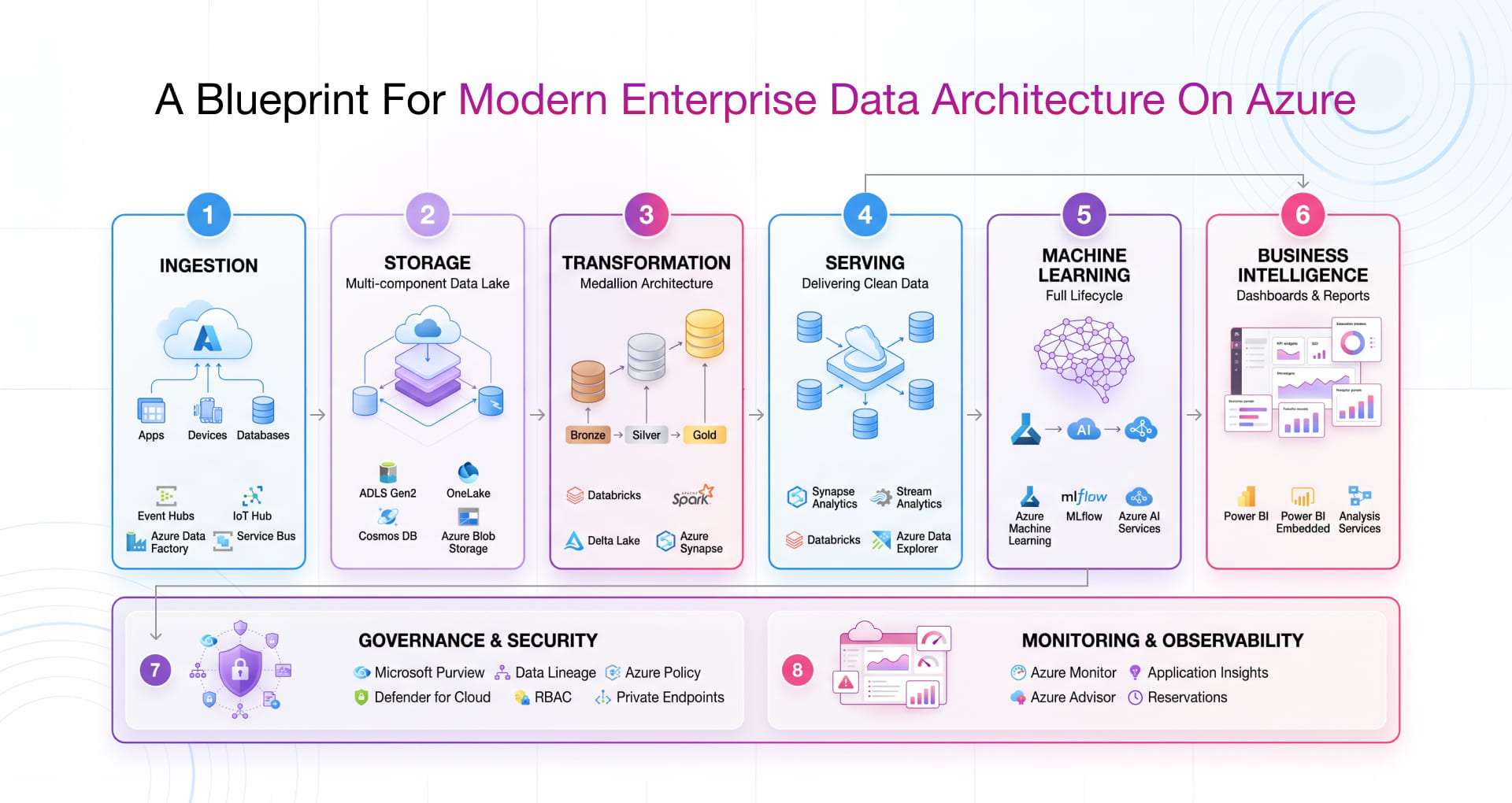
Layer 1: Ingestion
This is the entry point where all your data arrives. Pick tools based on what you actually have coming in.
- Event Hubs handles high-volume streams from apps and devices, great for both batch and real-time.
- IoT Hub builds on that for device-heavy setups, adding provisioning, twins, and two-way commands.
- Data Factory supports batch-oriented data integration and orchestration across heterogeneous sources, with solid retries and scheduling.
- Service Bus shines when you need guaranteed delivery and ordering for important messages.
Big companies often run a mix of all these. Smaller teams should start simple with just what their sources demand.
Layer 2: Storage
ADLS Gen2 is the bedrock: hierarchical, secure with proper ACLs and smart about costs even at petabyte scale.
- OneLake (in Fabric) adds shortcuts so everything feels like one big lake without duplicating data. It’s more about better governance and unified workspaces than a full storage swap.
- Cosmos DB steps in when you need super-fast operational reads with global reach.
- Azure Blobs for straightforward, massive unstructured files.
Your storage decisions ripple out to ML pipelines too, not just analytics.
Layer 3: Transformation
Here’s where raw data actually becomes trustworthy, using the Medallion approach.
- Bronze: Raw, untouched data exactly as it landed, immutable.
- Silver: Cleaned up, validated, and enriched.
- Gold: Ready-to-use aggregates and models for the business.
Databricks is fantastic for heavy ML work because it ties Spark, Delta Lake, and MLflow together. Synapse Spark may be considered for appropriate Spark workloads, depending on performance, integration, and cost requirements. The real cost saver is smart cluster management, not endlessly running both tools.
Layer 4: Serving
This layer delivers clean data to analysts, apps and AI agents.
- Synapse Analytics gives fast SQL on your data to use serverless for ad-hoc work and provisioned for heavy, predictable loads.
- Stream Analytics handles real-time processing and alerts with low latency.
Databricks and Azure Data Explorer are solid for time-series or log-heavy cases.
Layer 5: Machine Learning
ML needs to be core, not bolted on later.
- Azure ML covers the full lifecycle with AutoML and strong governance.
- Databricks + MLflow keeps everything in one place if you’re already there for data work.
- Azure AI Services for quick wins using pre-built vision, language, or speech capabilities.
Pick based on how complex your models are, how often they retrain, and how much control your team wants.
Layer 6: Business Intelligence
This is where all the hard work below finally shows its value to decision-makers.
- Power BI is the main workhorse for modelling, visualisation, and self-service. DirectLake mode pulls straight from Gold tables efficiently.
- Power BI Embedded puts analytics inside your own apps.
- Analysis Services for complex metrics that need to stay consistent across multiple tools.
Synapse powers the speedy queries underneath.
Layer 7: Governance & Security
Without this, the whole thing stays fragile.
- Purview maps lineage, classifies sensitive data, and keeps track of everything.
- Azure Policy enforces standards automatically.
- Defender for Cloud gives you one view of security across everything.
Add RBAC, row-level security, private endpoints, encryption, and auditing to make it truly solid.
Layer 8: Monitoring
If you’re not watching it, you can’t trust it.
- Azure Monitor + App Insights for alerts, performance tracking, and a single overview.
- Advisor constantly suggests improvements.
- Reservations deliver serious savings on steady workloads.
Modern data platforms require DataOps methodology to establish repeatable engineering and operations functions. Source control, automated testing, CI/CD, infrastructure as code, environment-specific configuration, automated deployment, monitoring, and rollback procedures should be integrated into the platform engineering process. Moreover, the set of key performance indicators should include not only infrastructure-related metrics but also pipeline availability, data freshness, data quality, processing latencies, SLA compliance, and platform costs.
Done right, you get no silent failures, clear cost tracking and proactive fixes. This setup keeps things practical and ready for whatever your organisation actually needs.
How Agentic AI Is Changing Data Architecture Requirements in 2026
As modern enterprises expand their AI initiatives, traditional architecture must adapt and evolve into a more intelligent modern cloud data architecture that’s capable of supporting real-time retrieval, reasoning and automation.
An AI-ready data platform is more than a data lake or a stack of AI services. What actually needed to push it further the combined bunch of trust, governed trusted, governed, contextual data while keeping ownership and security clear. It include both structured and unstructured datalike documents, PDFs, knowledge repositories, and images.
For GenAI and RAG, some use cases also need document processing, chunking, embeddings, vector or hybrid search, metadata filters and secure retrieval. Add those capabilities when the use case calls for them rather than making them mandatory across the whole platform.
Why Agentic AI Needs New Capabilities
Traditional data systems were built for dashboards and scheduled reports with predictable, periodic users. Agentic AI works differently. It pulls data unpredictably and continuously, often right in the middle of a conversation. These systems need fast access to fresh, governed data instead of static historical tables.
Integrating Vector Search and RAG into Your Azure Setup
For RAG use cases that need semantic retrieval, Azure AI Search can provide vector or hybrid search across structured and unstructured content. In those cases, the Medallion architecture’s Gold layer may need a parallel preparation path for AI retrieval rather than BI reporting alone.
Freshness and Continuous Ingestion
Data refreshed in batches works fine for weekly reports, but it falls short when an AI agent answers customers in real time. That’s why more teams now use continuous or near-real-time ingestion. Microsoft Fabric’s unified pipelines and Azure AI Search’s incremental indexing help close the gap between source data and what agents can actually use.
Simple Readiness Framework – Do You Need an Agentic Layer?
Evaluate your enterprise platforms against these four pivotal requirements to determine your agentic capability baseline:
- Real-Time Data Pipelines
Is data freshness aligned with the latency requirements of each business and AI use case?
- Automated Semantic Quality
Does your transformation layer execute strict programmatic schema testing and anomaly isolation before analytical tables are published?
- Unified Vector Accessibility
Can relevant enterprise knowledge be securely indexed and retrieved for AI use cases where semantic retrieval is required?
- Zero-Trust Tool Execution
Can your authentication models safely execute granular Service Principal and fine-grained row-level security tokens for autonomous non-human API requests?
How to Implement Modern Data Architecture on Azure: A Step-by-Step Roadmap
Building a strong enterprise data platform on Azure works best when you roll it out in clear phases. This approach delivers early value, reduces risk and keeps things manageable.
Phase 1 – Foundation and Quick Wins (Months 1–3)
- Set up secure Enterprise Landing Zones with proper access controls and governance policies.
- Deploy Microsoft Purview to scan and catalog your existing data sources with basic security classifications.
- Modernize 2–3 critical data sources. Build automated pipelines that feed into Azure Data Lake Storage. This creates a reliable central data store and cuts manual work.
Phase 2 – Building the Core Platform (Months 4–8)
- Design your storage estate using ADLS Gen2 or Microsoft Fabric OneLake with clear functional zones. This lays a robust foundation for a scalable Microsoft modern data warehouse architecture that supports analytics, reporting and AI workloads.
- Implement the Medallion architecture with Azure Databricks. Create automated pipelines that transform raw data into clean, high-quality Gold tables.
- Enable operational analytics with Azure Synapse and Power BI. This gives business teams fast access to trusted dashboards and reports.
Phase 3 – AI-Readiness, Optimization & Hardening (Months 9–12+)
- Where semantic retrieval is needed, add Azure AI Search for document processing, chunking and vector or hybrid search to support enterprise RAG.
- Build serving APIs that power agentic AI and real-time access.
- Focus on performance tuning and cost optimization. Many teams bring in expert partners like Rishabh Software for 24/7 monitoring and support.
AI-readiness assessment phased helps you move forward steadily and delivers tangible business value at every step.
Maturity Checklist
Avoid common architectural anti-patterns, such as “data swamps” (unindexed unstructured dumping grounds) or disconnected “shadow IT” operational platforms. A completely mature Azure modern enterprise data architecture demonstrates five uncompromised characteristics:
- Reliable Observability: – Automated monitoring of pipeline failures, data quality, schema changes, and operational SLAs.
- Fit-for-Purpose Analytics Performance: – Performance and data freshness aligned with business requirements.
- End-to-End Data Governance: – Appropriate metadata, lineage, ownership, quality, and access controls across critical data assets.
- Secure AI Integration: – Governed and controlled access to enterprise data for AI and agentic use cases where required.
- Sustainable Cloud FinOp: – Visibility and accountability for platform consumption, performance, and cost.
For actionable tactics, dive into our Azure Cost Optimization eBook.
Best Practices for a Modern Azure Data Architecture (Microsoft)
While there is always room for improvement, every company has certain basic best practices that are non-negotiable and apply to all their data architectures. Here are some best practices for building modern analytics solutions in Microsoft Azure:
- Focus on business use cases and data needs first and defer technology and other implementation-specific details to later stages in solution design.
- Incorporate security, governance, and data quality considerations into your designs from the start.
- Design and implement reusable, testable, and observable data pipelines that yield value to the business instead of connecting applications through point-to-point data flows.
- Select from available analytics patterns (batch, streaming, warehouse, lake house, and others) based on specific business needs and workload requirements.
- Ensure that your analytics architecture provides a comprehensive set of metadata, lineage, ownership, and quality information about your business data.
- Design your analytics foundation to support a wide range of workloads, including Business Intelligence, analytics, and machine learning, and advanced analytics, rather than building separate siloed systems for different workloads.
- Optimize analytics solutions for performance, reliability, scalability, and cost.
How Rishabh Software Helps Build Modern Data Architecture on Azure
Rishabh Software, as an official Microsoft Cloud Solution Provider Partner, helps enterprises design and implement Azure modern data architecture solutions using proven frameworks and hands-on execution experience across Azure Analytics, Azure Managed Services, and custom data platform development.
Success Stories – Our Proven Enterprise Work
- Cloud-Based Industrial eCommerce Platform Modernization on Azure: Engineered a completely unified data integration and advanced analytics foundation to resolve deep complex legacy application debt and accelerate reporting efficiency across distributed industrial retail environments.
- Australian EdTech e-Learning Platform Modernization on Azure: Modernized an enterprise digital e-learning architecture by implementing highly scalable data ingestion pipelines and custom analytics to deliver sub-second student engagement insights.
- Digital Ad Inventory Management Software Modernization: Designed a highly resilient, high-throughput streaming data infrastructure on Azure capable of absorbing and continuously aggregating real-time programmatic ad bidding telemetry without latency degradation.
If you’re ready to design an Azure data architecture that’s designed both for today’s workloads and tomorrow’s AI requirements, explore our Microsoft Azure Consulting Services to start the conversation.
Frequently Asked Questions
1. What is modern data architecture?
Modern data architecture works like a layered system designed to handle massive amounts of data without breaking. It manages everything from fast IoT streams pouring in by the millions to quick dashboards and AI tasks. It does all of this while keeping security and compliance in check. Azure has eight main layers: Ingestion, Storage with ADLS Gen2 and OneLake, Transformation using Medallion (Bronze, Silver, Gold), Serving, ML Integration, Business Intelligence, Governance and Monitoring. It replaces the old, siloed setups for one unified lakehouse that covers batch jobs, streaming and AI.
2. How does Agentic AI change data architecture requirements?
Unlike traditional BI tools that passively report historical aggregations, autonomous Agentic AI software executes proactive operational decisions and real-time tool calls. This requires your data platform to maintain ultra-low-latency real-time freshness, highly deterministic data quality, deep semantic search via vectorized document indexing (Azure AI Search), and zero-trust programmatic interfaces with highly granular access permissions.
3. Do small and mid-size companies need a data lakehouse?
Not necessarily. The decision should depend on data volume, variety, analytics and AI requirements, team capability, existing technology landscape, and cost. Historically, operating a highly capable data lakehouse demanded massive, dedicated engineering teams and prohibitive up-front cloud expenses. However, the emergence of highly streamlined cloud data platforms, fully managed SaaS analytics architectures like Microsoft Fabric, and highly cost-efficient transformation engines have dramatically lowered the barrier to entry. Implementing a well-architected lakehouse prevents long-term technical debt, eliminates fragmented legacy spreadsheets and ensures mid-market enterprises are completely AI-ready.
4. How does modern data architecture help with data analytics?
It simply makes analytics work better. You get clean Gold-layer data that feeds fast Power BI dashboards. Live streams bring real-time insights. One solid semantic layer stops teams from using different versions of the same numbers. Good governance builds real trust, and the built-in ML and vector search turns plain reports into smarter AI decisions.
5. Why do organizations struggle to modernize their data architecture?
Lots of companies stay stuck because of old legacy systems with messy connections and no clear data owners. Costs keep climbing from duplicated storage and sloppy cluster management. There’s often a big gap between the old ETL crew and folks who know Spark or ML. Weak governance creates compliance headaches too. And many teams make it worse by spinning up every Azure service instead of starting small with what they actually need.
6. What are some modern data architecture examples?
A classic one is the Medallion Architecture, where raw data lands in Bronze and stays untouched. Teams then clean and enrich it in Silver before shaping it into trusted business-ready tables in Gold on ADLS Gen2 or OneLake. Another example is the Lakehouse approach on Azure, where Fabric OneLake and Databricks work together for storage, transformation and ML using Delta Lake. Event Hubs or IoT Hub feed into Stream Analytics and then straight to live Power BI dashboards for real-time needs. Lastly, the AI-ready setup connects Gold tables to Azure AI Search vectors with Purview tracking lineage so AI agents get accurate context instead of guessing.