The app is ready. The interface looks right, the login works, data flows through the system, and the automated workflows run as expected. After a few rounds of prompts and iterations, what started as an idea is now a working application. It feels ready to launch.
Then real users arrive.
Two users try to update the same record. An expired session triggers an unexpected error. A request exposes data that should belong to another customer. An external service goes down, leaving a workflow incomplete. The app that worked perfectly during the demo now faces situations it was never adequately tested to handle.
This gap between a working application and a production-ready one deserves closer attention. Veracode’s 2025 GenAI Code Security Report found that AI-generated code introduced an OWASP Top 10 vulnerability in 45% of the coding tasks tested. This finding does not mean that 45% of AI-built applications are vulnerable, but it reinforces the need to validate generated code before release.
So, how do you know whether your AI-built or vibe coded app is ready for production? The answer lies in evidence, not appearances. These ten checks help you test critical controls, identify launch-blocking gaps, and make a more informed release decision.
What Does Production-Ready Mean for an AI-Built App?
An AI-built app is production-ready when evidence shows it can handle expected users and workloads securely, maintain data integrity, recover from failures, and support ongoing changes without breaking existing functionality.
Assessing AI readiness involves six core areas: security, correctness, reliability, performance, maintainability, and operational ownership. A successful deployment confirms that an application runs, but it does not establish that these six areas have been adequately addressed.
The ten checks below translate these areas into practical tests and pass criteria you can use to evaluate your AI -built or vibe coded application’s readiness before launch.
A Working Prototype vs. a Production Application
| Factor | Evidence a prototype offers | Evidence production requires |
| Access control | Login works for the person who built it | A second account cannot read or change the first account’s records, and logged-out requests are rejected by the server |
| Error handling | The main flow completes | Failed payments, timeouts and invalid input produce defined and logged outcomes |
| Concurrency | One user acts at a time | Simultaneous writes were tested and produced no duplicate or lost records |
| Recovery | Data exists in a single database | A backup has been restored into a clean environment and the restore time is known |
| Releases | Code is pushed from a laptop or from the builder | An automated deploy with staging, health checks and a rehearsed rollback |
What AI App Development Tools Build in Your App and What It Does Not
AI app development tools can generate code, configure databases, deploy applications, and automate workflows. However, production readiness for vibe coded or any other type of AI-built apps still depends on how your team handles security, access controls, testing, integrations, and ongoing maintenance. The following comparison outlines what Lovable, Supabase, Vercel, Railway, and n8n provide and what you need to verify before launch.
| Tools | What It Provides | What Your Team Owns |
| Lovable | Front end, backend, app logic, initial schema and policies, voice and search tools | Review of generated code, authorization logic, integration behavior, testing, and maintainability |
| Supabase | Database, authentication, storage, and backend capabilities | Row-level security, database permissions, data integrity, backups, and workload capacity |
| Vercel | Hosting for applications, APIs, workers, and other services | Security headers, deployment protection, environment variables, function region, log retention, spend alerts |
| Railway | Services, private networking, managed databases, environments, deployment rollback | Service health, resource limits, environment configuration, recovery, and deployment behavior |
| n8n | Workflow automation and integration | Credential security, duplicate executions, retries, failure handling, and execution monitoring |
The 10 Production-Readiness Checks for Your AI-Built App
The following ten checks help you assess your AI-built app’s security, data integrity, reliability, and operational readiness before launch. Each check includes a practical test and a pass criterion. Treat failures in authentication and access control, database security, exposed secrets, or failure recovery as potential launch blockers until the risks are resolved.
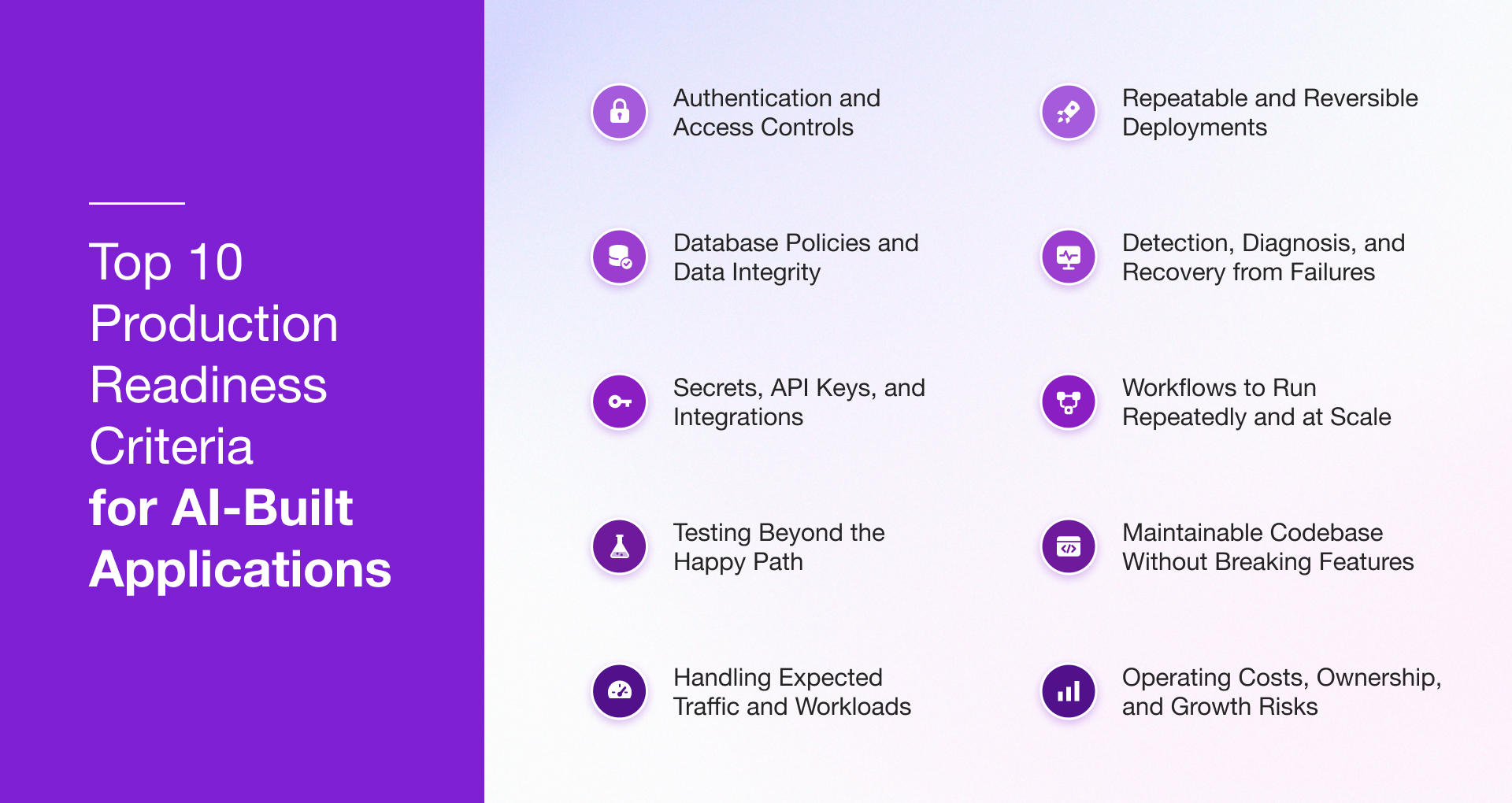
1. Are Authentication and Access Controls Enforced on the Server?
Working login does not guarantee that users can access only the data and actions permitted by their roles.
So your dev team should review session expiry, password recovery, role-based access control (RBAC), and administrative permissions. For multi-tenant apps, verify that users cannot view or modify another customer’s records by manipulating API requests.
How to test: Create two test accounts with separate records. Try accessing the second account’s data when you’re signed in as the first, then repeat the test without authentication and with a standard user attempting an administrative action.
Pass criterion: Every unauthorized request should get rejected by a server-side or database control. Hiding a button in the frontend is not sufficient.
Broken access control remains a leading category in the OWASP Top 10: 2025
2. Are Database Policies and Data Integrity Properly Enforced?
The database should enforce access permissions and data integrity rules rather than relying solely on frontend validation.
For Supabase apps, you have to get row-level security (RLS) policies inspected in all tables exposed to clients. Confirm that users can read, insert, update, and delete only permitted records. Review constraints, indexes, transactions, and schema migrations as well.
Consider what happens when users submit a form twice, update an already-modified record, or interrupt a multi-step operation. Each scenario should leave the database in a valid state.
How to test: Examine database policies, attempt unauthorized tasks with different user roles, and apply migrations in a test environment. Verify that you can restore backups successfully.
Pass criterion: Access permissions are enforced at the database level, invalid data is rejected, concurrent operations are handled correctly, and critical transactions preserve data integrity.
3. Are Secrets, API Keys, and Integrations Protected?
External integrations, such as payment gateways and email services, introduce additional security risks because they require credentials and defined permissions.
Search the repository and built frontend assets for API keys, database credentials, and service-role tokens. Browser-visible configuration might contain intentionally public keys but privileged credentials should be on a trusted backend. Review webhook authentication and the handling of failed external requests, too.
How to test: Scan the codebase and deployed assets for exposed credentials, check environment-variable settings, rotate compromised keys, and verify webhook signatures or other authentication controls.
Pass criterion: Privileged secrets are protected, integrations use limited permissions, and unauthorized requests are rejected.
4. Has the Application Been Tested Beyond the Happy Path?
The primary user journey is only one part of application testing. Invalid inputs, expired sessions, duplicate submissions, and interrupted API calls can expose defects that a successful demo will not catch.
Hence, your dev team needs to build coverage around important business operations using unit, integration, end-to-end, and regression tests. AI-assisted changes deserve particular attention because what might look like a small instruction can alter multiple components or affect existing functionality.
How to test: Run critical workflows in staging with missing fields, invalid values, insufficient permissions, failed API calls, and repeated submissions. Rerun regression tests after changes.
Pass criterion: Core workflows pass repeatable tests, failures produce controlled responses, and known regressions are addressed before release.
5. Can the App Handle Expected Traffic and Workloads?
A fast response for one user does not tell you how the app will behave when many people use it at the same time. Database queries, network latency, resource limits, and third-party dependencies can all affect performance.
Begin by defining expected concurrent users, request volumes, data sizes, and response-time targets. Supabase apps need suitable query plans, indexes, and database capacity. Vercel deployments require attention to function execution, caching, and regional placement, and Railway services need appropriate resource allocation.
How to test: Run load tests in staging with representative data and traffic patterns. Include activity spikes and delayed responses from dependent services.
Pass criterion: The app meets agreed response-time and error-rate targets without exhausting compute resources, database connections, or external service limits.
6. Are Deployments Repeatable and Reversible?
A release process involves more than pushing code to a live environment. Your team should be able to reproduce deployments, verify application health, and recover safely when a release causes problems.
Check environment separation, dependency lockfiles, configuration management, and database migration procedures. Also account for schema changes as rolling back code will not necessarily reverse a database change or restore altered records.
How to test: Deploy to staging, verify health checks, and rehearse a rollback. Confirm that the previous application version remains compatible with the database schema and that migration recovery steps are documented.
Pass criterion: Releases are reproducible, deployed versions are identifiable, and the team can execute a tested recovery procedure.
7. Can You Detect, Diagnose, and Recover from Failures?
When something fails in production, the team needs enough evidence to understand the cause and assess the impact.
Review application logs, error tracking, infrastructure metrics, uptime monitoring, and alert thresholds. Logs should capture useful diagnostic context without exposing passwords, tokens, or sensitive customer information. Assign incident owners and establish recovery objectives based on business needs.
How to test: Simulate a database timeout or unavailable external API in staging and check whether the correct person receives an alert, and the recovery procedure works as expected.
Pass criterion: Material failures can be detected and resolved within agreed operational requirements.
One distinction matters here: A deployment health check does not replace continuous monitoring after an app goes live.
8. Are n8n Workflows Safe to Run Repeatedly and at Scale?
Automations can affect business operations even when the app itself remains available. A failed or repeated n8n execution could trigger duplicate notifications, create repeated invoices, or leave synchronized records inconsistent.
Review retry behavior, credential storage, workflow permissions, and failure handling. Where an event might be processed more than once, implement idempotency controls or deduplication logic so a retry does not repeat an unintended action.
How to test: Force a controlled workflow failure, inspect the execution record, and retry it. Check whether completed steps run again and whether any duplicate business actions occur.
Pass criterion: Failed executions are visible, retries are controlled, credentials are protected, and repeated processing does not corrupt data or trigger unintended actions.
9. Can the Codebase Be Maintained Without Breaking Features?
Engineers need to understand an app’s structure and assess the effects of each change to maintain it, since the app will eventually need fixes, integrations, and new features.
Inspect duplicated logic, dependency versions, error handling, automated tests, and documentation. Confirm that the organization controls the source repository and that another engineer can build and deploy the app without depending entirely on the original creator.
AI-generated code requires close review when repeated patches introduce inconsistent validation or duplicate business rules across the frontend, backend, and database.
How to test: Ask an engineer unfamiliar with the original build to trace a critical workflow, make a small change, run the relevant tests, and deploy it to staging.
Pass criterion: Engineers can understand the architecture, reproduce builds, review changes, and maintain the application independently.
10. Are Operating Costs, Ownership, and Growth Risks Understood?
Development is only one part of an application’s cost. Hosting, database usage, third-party APIs, AI model consumption, workflow executions, monitoring, and ongoing maintenance all contribute to its operating expenses.
Estimate monthly costs under expected and higher-than-expected workloads. Review service limits and pricing models, configure budget alerts where available, and document ownership of the source code, cloud accounts, credentials, and backups.
How to test: Prepare an operating-cost estimate, review usage limits, verify account and asset ownership, and assign responsibility for maintenance and incident response.
Pass criterion: The business understands expected operating costs, controls essential assets and accounts, and has clear ownership of ongoing operations.
An AI App Production-Readiness Scorecard
Use this scorecard to organize the assessment and assign remediation work:
| Readiness Area | Suggested Weight |
| Security and access control | 25% |
| Data integrity and recovery | 20% |
| Functional and regression testing | 15% |
| Performance and scalability | 10% |
| Deployment and rollback | 10% |
| Monitoring and incident response | 10% |
| Maintainability and ownership | 5% |
| Cost and operational constraints | 5% |
| Total | 100% |
For each control, record one of three outcomes:
- 0 – Failed or unverified. The control is missing, the test failed, or there is no evidence that it works.
- 1 – Partially implemented. The control exists, but testing or implementation remains incomplete.
- 2 – Verified. The control has passed an appropriate test, and the evidence is recorded.
Use the results to set deadlines and prioritize remediation. A high aggregate score should not override a critical security or data-integrity failure. The application should not be released until mandatory controls pass and the remaining risks have been reviewed as per its business requirements.
Production-Readiness Checks for Lovable, Vercel, Supabase, Railway, and n8n
The table below lists what to validate first on each platform and the evidence worth asking your engineering team to provide.
| Tool | Priority Checks Before Launch |
| Lovable | Review generated code, authentication, authorization, testing, and source-code ownership. |
| Supabase | Verify RLS policies, database permissions, authentication settings, migrations, backups, and query performance. |
| Vercel | Review environment configuration, security headers, rate limiting, deployment rollback, monitoring, and usage limits. |
| Railway | Verify health checks, service configuration, resource limits, deployment behavior, logs, and recovery procedures. |
| n8n | Test failed executions, retries, duplicate processing, credential permissions, and workflow monitoring. |
Now, to turn the ten checks into a scorecard, rate each as pass, partial or fail, and record the evidence, severity, owner and remediation status beside it.
Any fail among checks 1, 2, 3 and 7 holds the launch. Several partials among the remaining checks generally mean a revised sprint before release.
Should You Fix, Refactor, or Rebuild Your AI-Built App?
Five factors determine the answer: defect severity, architecture, testability, business criticality and remediation cost.
- Fix the app when the findings are localized to configuration or policy, such as missing row-level security, exposed keys, absent security headers or untested backups, and when tests can be written around the existing behavior.
- Refactor when the business logic works but its structure prevents safe change, for example duplicated rules, access checks located in interface components, or a single environment serving development and production.
- Rebuild when the data model cannot support the tenancy or integrity the business requires, when authorization is spread in the interface with no central enforcement, or when the estimate to remediate approaches the cost of a new build.
Applications whose data model and core flows are sound generally fall into the first two categories, which keeps the validated product requirements and replaces only the weak layers.
Two Examples of Productionizing AI-Built Apps by Rishabh Software
Rishabh Software assessed a customer-facing analytics product built largely through AI prompting by a semi-technical team. Managed authentication, a modular backend, and automated functional tests were already in place. Based on these strengths, the assessment supported retaining the existing architecture and addressing the identified gaps.
| Gap identified | Engineering response |
| Customer separation relied on application-level filters. | Strengthened isolation and validation across customer boundaries. |
| Database and administrative access were too permissive, with gaps in session handling and asset exposure. | Tightened access controls, credential handling, and session security. |
| External AI calls sent more customer data than necessary. | Minimized the customer data included in AI requests. |
| Analytical context was supplied by the browser. | Moved context handling to trusted server-side components. |
Outcome
- The existing product was retained without a rebuild.
- The client gained a clearer basis for making release decisions.
- A prioritized backlog was established for reliability and recovery improvements.
Make the Production Decision Based on Evidence
A successful demo shows that an AI-built app can perform its intended tasks under expected conditions. Production readiness requires evidence that it can also handle failures, protect data, and operate reliably under real-world conditions. The ten checks above give your team a practical starting point for evaluating those risks.
Prioritize Checks 1, 2, 3, and 7, which address access control, data integrity, exposed credentials, and failure recovery. Record the results and identify any gaps that could block release.
If your team needs help addressing those gaps, Rishabh Software’s AI/ML development services can help strengthen the application, from targeted fixes to larger architectural changes.
Our engineers assess the existing codebase, data model, and platform configuration against the identified risks, then prioritize findings by severity. Based on the results, we help determine whether the application needs targeted fixes, refactoring, or a rebuild.
Schedule a consultation to discuss an assessment of your AI-built application and identify the next steps toward production readiness.
Frequently Asked Questions
Q: Do AI-built apps work?
A: Most do work for the scenarios their builder tested, which usually means a single user, clean data and responsive services. Whether they keep working under concurrent users, invalid input and provider outages depends on testing that the generation tool does not perform by default.
Q: Is AI-generated code safe for production?
A: AI-generated code introduced an OWASP Top 10 vulnerability in 45% of tested tasks, which makes security scanning, human code review and access-control testing sensible requirements before any release that handles customer data. Code that passes all three can be released with reasonable confidence.
Q: How do I know if my vibe-coded app is secure?
A: Create two accounts, request one account’s records while signed in as the other, and repeat the request without a session. Then search the built frontend for API keys and review row-level security policies on every database table. Any request that succeeds without authorization points to a gap.
Q: What does “production-ready” mean for an app?
A: An app qualifies as production-ready once its team can present evidence for six areas – security, correctness, reliability, performance, maintainability and operational ownership. Evidence includes test results, configuration records and a restored backup, and a successful deployment alone does not supply any of them.
Q: Should I Fix, Refactor, or Rebuild an AI-Built App?
A: A complete rewrite is not always necessary before launch. Fix the app when issues are limited to configuration, security policies, or exposed credentials. Refactor when the core functionality works but the code structure makes safe changes difficult. Rebuild when fundamental architectural or data-model limitations prevent the app from meeting security, data integrity, or business requirements, or when remediation is not economically viable. Base the decision on the assessment findings, not simply on the fact that AI generated the code.
Q: What are the risks of using AI-generated code?
A: Four risks recur in practice – access-control gaps, secrets left in client code, duplicated or inconsistent business logic that raises maintenance cost, and thin test coverage that lets changes break unrelated features. Dependencies and licensing terms also deserve review before the code reaches production.