
AI agents are pushing the boundaries of productivity, efficiency, and collaboration and the enterprises that understand this early are pulling ahead of the ones still managing operations manually.
Are you investing time and effort into finding productivity loopholes in your business, while using your resources and capabilities the wrong way? Or does AI agent adoption feel heavy? This will never be the case now.
How?
Now, businesses can overcome these productivity and efficiency challenges with low-code AI agent development powered by Microsoft Copilot Studio. Organizations can build AI agents in copilot studio with the integration capabilities across Microsoft ecosystem and beyond it without introducing standalone chatbots or additional operational complexity.
This blog explores where AI agents can be integrated using Copilot Studio, how businesses can build and deploy them through a simplified process, and real-world use cases that help organizations understand where Copilot Studio AI agents can deliver the most operational impact. Let’s take the next step with an in-depth exploration.
Enterprise Systems and Platforms That Integrate with Microsoft Copilot Studio AI Agents
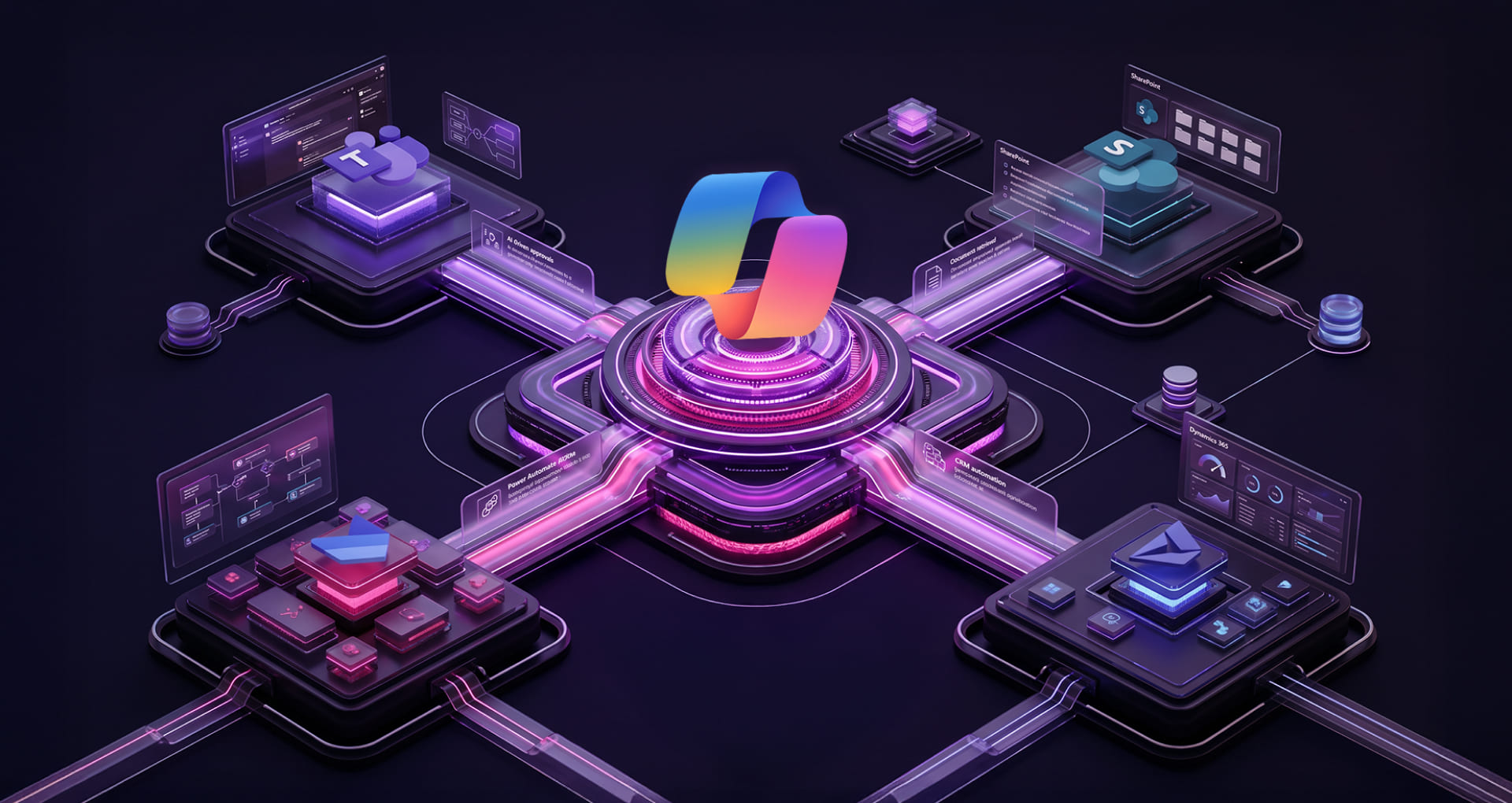
Business-aligned automation powered by AI agents through Microsoft Copilot Studio starts with understanding the extensive integration capabilities it offers across enterprise Microsoft environments. Beyond the Microsoft ecosystem, Copilot Studio enables businesses to integrate AI agents with enterprise applications, operational workflows, external platforms, APIs, databases, and business systems.
Let’s see; Before that, let’s focus on the core architecture of Copilot Studio that provides a perfect view of building an AI agent for a low-code approach.
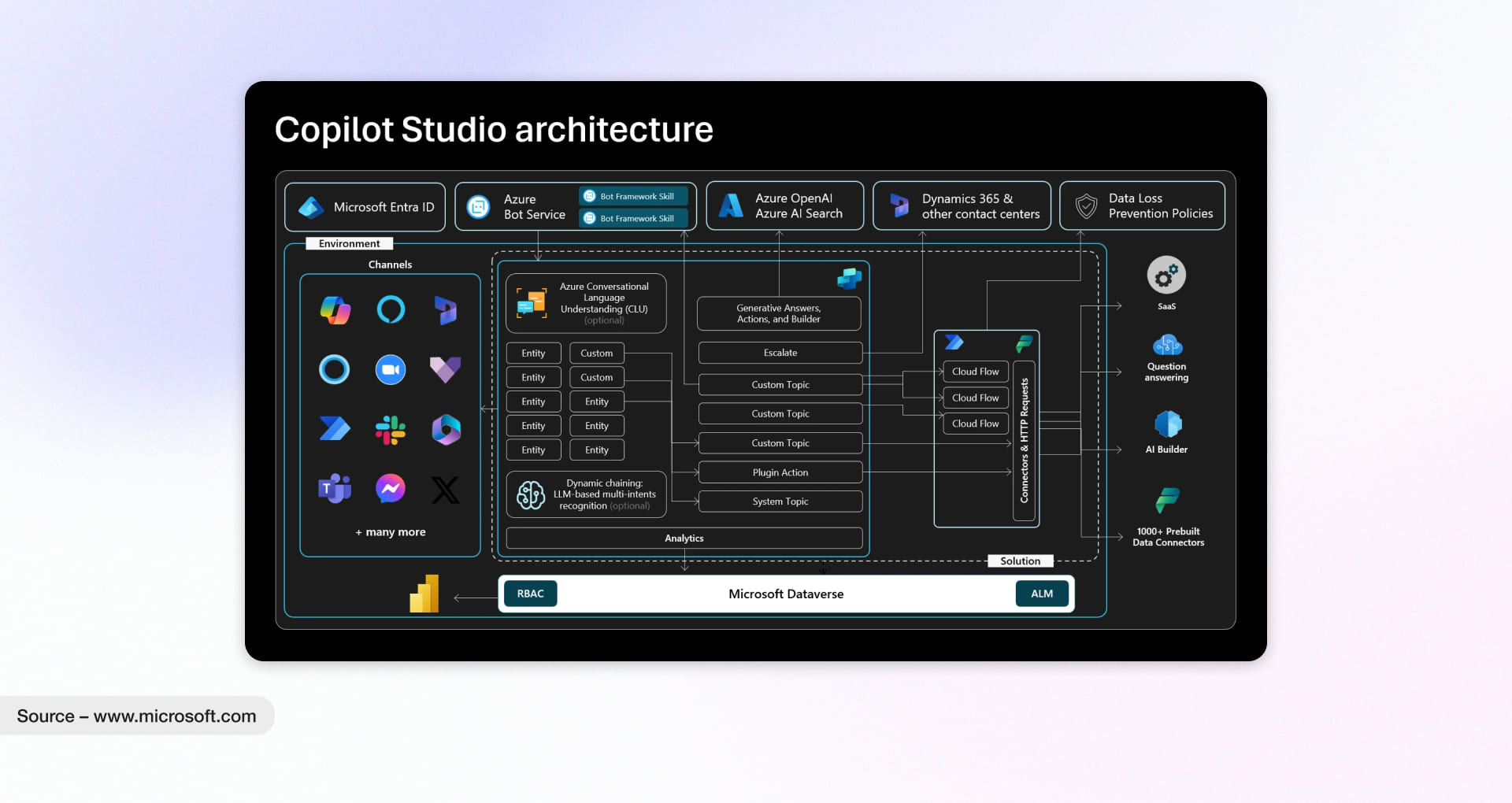
| Platform or Environment | How Copilot Studio AI Agents Support Business Operations |
| Outlook | A lot of operational delays start with overloaded inboxes and scattered communication. Copilot Studio AI agents help teams handle emails, schedule meetings, draft responses, and coordinate daily activities without spending hours managing repetitive communication tasks. |
| Microsoft Teams | Teams has become the center of day-to-day collaboration for many businesses. That’s where Copilot agents start to stand out. They can support approvals, answer operational questions, manage internal requests, and help employees move workflows forward without constantly switching systems. |
| SharePoint | Finding the right document at the right time sounds simple until teams are dealing with hundreds of files, SOPs, and policies. Copilot Studio agents can pull relevant information directly from SharePoint, helping employees find answers faster and reducing operational slowdowns. |
| Power Automate | Here’s where things get practical. When connected with Power Automate, Copilot Studio AI agents can trigger workflows, send notifications, manage approvals, and automate repetitive business processes that usually consume valuable operational time. |
| Dynamics 365 | Sales and customer service teams often struggle with disconnected information across CRM workflows. Copilot Studio agents help bring relevant customer data, updates, and operational context together so teams can respond faster and work more efficiently. |
| Dataverse | Business operations rely heavily on structured data, but accessing the right information isn’t always easy. Copilot Studio agents connected with Dataverse can securely surface role-specific insights and responses based on operational needs. |
| Websites & Customer Portals | Customer interactions don’t stop after business hours. Copilot Studio AI agents can extend support across websites and portals to handle common queries, guide users, and simplify digital experiences without increasing support workload. |
| Third-Party Applications & APIs | Most businesses don’t operate inside a single ecosystem anymore. That’s the challenge. Copilot Studio AI agents can connect with external applications, APIs, and enterprise systems to support broader workflows and more connected business operations. |
Key Capabilities of Copilot Studio that Make Building AI Agents Easier and Faster
Microsoft Copilot Studio simplifies how businesses build AI agents by combining low-code development, workflow integration, enterprise connectivity, and faster deployment within a single platform. Instead of building isolated AI experiences, organizations can create AI agents that naturally fit into existing business operations and systems.
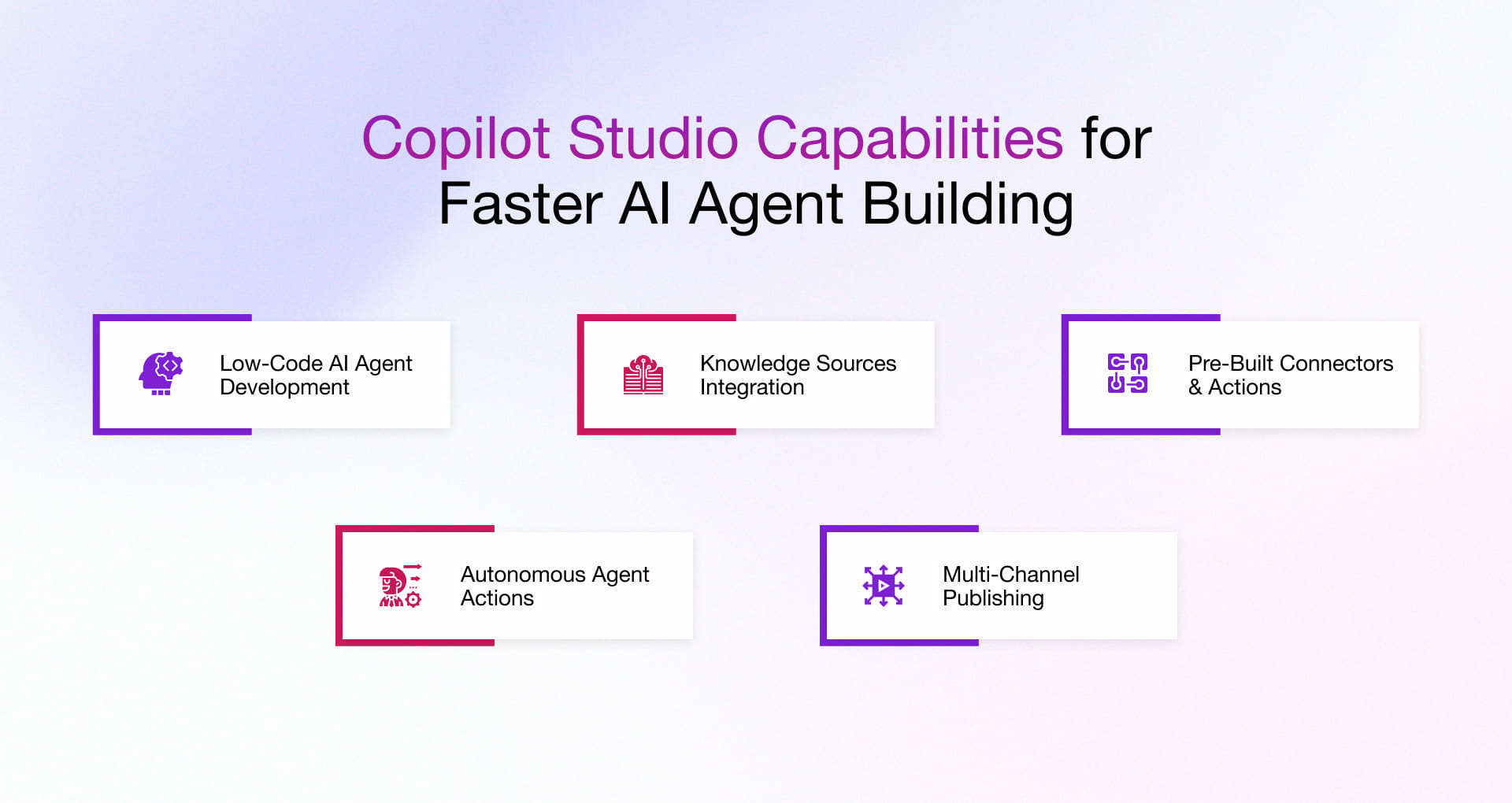
Here are the key capabilities of Copilot Studio for building AI agent more seamlessly.
1. Low-Code AI Agent Development
AI agent development services used to depend heavily on technical teams, long timelines, and complex implementation cycles. That’s changing fast. With Copilot Studio, business teams can start building and testing agents themselves using simple prompts and familiar tools. The real advantage isn’t just speed. It’s the flexibility to improve workflows as operational needs evolve without waiting for large development backlogs.
2. Knowledge Sources Integration
One of the biggest frustrations with AI systems is the tendency to give generic responses that don’t really help. Copilot Studio AI agents avoid that by pulling information directly from internal documents, policies, product catalogs, SOPs, and company knowledge sources. So instead of broad answers, employees and customers get responses grounded in the business’s actual operations. That’s where things start to feel useful in day-to-day work.
3. Pre-Built Connectors & Actions
Answering questions is one thing. Taking action inside business systems is where it starts to pay off. Copilot Studio agents can connect to CRMs, ERP platforms, HR systems, ITSM tools, and other operational applications to retrieve records, trigger approvals, raise tickets, or update information within a single interaction. It cuts down the usual back-and-forth that slows teams down more than most businesses realize.
4. Autonomous Agent Actions (Agentic Loops)
Some workflows aren’t simple. A customer issue might involve verification, approvals, status checks, and follow-ups across multiple systems. Here’s where things get interesting. Microsoft Copilot agents can manage multi-step processes more independently by understanding context, making decisions, and progressing tasks without human involvement at every stage. It doesn’t replace people. It removes repetitive operational load so teams can focus on work that actually needs judgment and attention.
5. Multi-Channel Publishing
Businesses operate across multiple channels like internal portals, customer websites, Teams, mobile apps, and Microsoft 365 Copilot. Copilot Studio enables the same agent to serve across all these surfaces simultaneously, maintaining a consistent brand voice, policies, and capabilities everywhere. This means a unified experience for customers and employees alike, with no duplicated effort required to manage separate bots per platform.
Real Enterprise Use Cases for AI Agents Built with Copilot Studio
If you’re still in the bubble that AI agents are only about chatbots, this section is worth exploring. Businesses worldwide are building AI agents with Copilot Studio and leveraging automation to the greatest extent possible across repetitive and operationally demanding processes.
As a Microsoft Technology Services provider, our in-house experts continuously research and identify some of the most practical and high-impact use cases for Copilot Studio AI agents, and this is still only scratching the surface.
1. Employee Support Agents Inside Microsoft Teams
Built with: Copilot Studio + Teams + SharePoint + Power Automate
Short but critical questions constantly move across every organization. HR policies, IT support, leave approvals, and facilities requests. Some take minutes to resolve. Others sit in queues because employees don’t know where to go. Copilot Studio AI agents integrated within Teams can retrieve answers directly from connected SharePoint knowledge sources, handle common operational requests, and escalate complex issues with context already attached.
- Real-world example – Wipro:
Wipro leveraged Microsoft 365 Copilot capabilities to improve employee productivity, streamline collaboration, and simplify operational workflows across teams.
2. SharePoint-Powered Knowledge Retrieval Agents
Built with: Copilot Studio + SharePoint + Azure AI Search + Microsoft 365 Copilot
These agents retrieve contextual answers from policies, SOPs, compliance documents, and enterprise knowledge stored inside SharePoint using retrieval-augmented generation (RAG). Employees receive grounded responses with source references, eliminating the need to manually search across documents and repositories.
- Real-world example – Dunaway:
Dunaway built a Copilot Studio agent to streamline city code research and regulatory compliance lookups across the engineering workflow. Impact? reducing manual search efforts.
3. AI Agents for Sales & CRM Workflows in Dynamics 365
Built with: Copilot Studio + Dynamics 365 + Teams + Power Platform Connectors
Sales and customer support teams can retrieve customer insights, summarize interactions, trigger workflows, and manage follow-ups directly within CRM workflows without constantly switching between systems.
- Real-world example – T-Mobile:
T-Mobile used Copilot Studio and Power Apps to provide customer service teams with real-time access to customer and device information during live support interactions. - Real-world example – LTM:
LTM used Microsoft AI agents and Copilot capabilities to modernize customer engagement workflows and improve operational efficiency across teams.
4. Document & Approval Workflow Automation
Built with: Copilot Studio + Power Automate + SharePoint + Outlook + Teams Approvals
These agents automate invoice validation, onboarding checks, compliance reviews, and approval workflows by validating documents, triggering approvals, routing requests, and escalating exceptions automatically.
- Real-world example – ABN AMRO Bank:
ABN AMRO implemented Copilot Studio agents to streamline internal operational workflows, including IT helpdesk and facilities-related processes.
5. IT Helpdesk & Ticket Resolution Agents
Built with: Copilot Studio + Teams + Outlook + Dynamics 365 + Power Platform Connectors
IT support agents automate repetitive requests like password resets, software access, troubleshooting guidance, ticket routing, and support escalations before human intervention becomes necessary.
- Real-world example – Standard Bank of South Africa:
Standard Bank developed an IT helpdesk bot using Copilot Studio that reportedly resolves 99% of employee queries.
Step-by-Step Process to Build AI Agents in Copilot Studio
Now, it’s high time to explore how to build your own customized Microsoft Copilot Studio AI agent with quick, expert-defined steps.
1. Define the Operational Goal and Business Scenario
Before building AI agent using Copilot Studio, businesses need clarity around the operational problem or improvement areas itself.
A strong starting point usually has:
- repetitive workflows
- measurable delays
- fragmented systems
- existing enterprise knowledge already available somewhere inside Microsoft environments
Instead of broad goals like improve employee experience, the most successful deployments start narrower:
“Reduce IT support tickets related to password resets.”
“Automate invoice approval routing.”
“Simplify compliance document retrieval.”
You can contact us or partner with us to learn how to get started and explore our Microsoft Data and AI services.
2. Map the Workflow and Interaction Pattern
Once the business scenario is defined, the next step is understanding how the process actually moves across systems, people, triggered actions, and outcomes.
Most AI agent workflows quietly follow the same structure underneath:
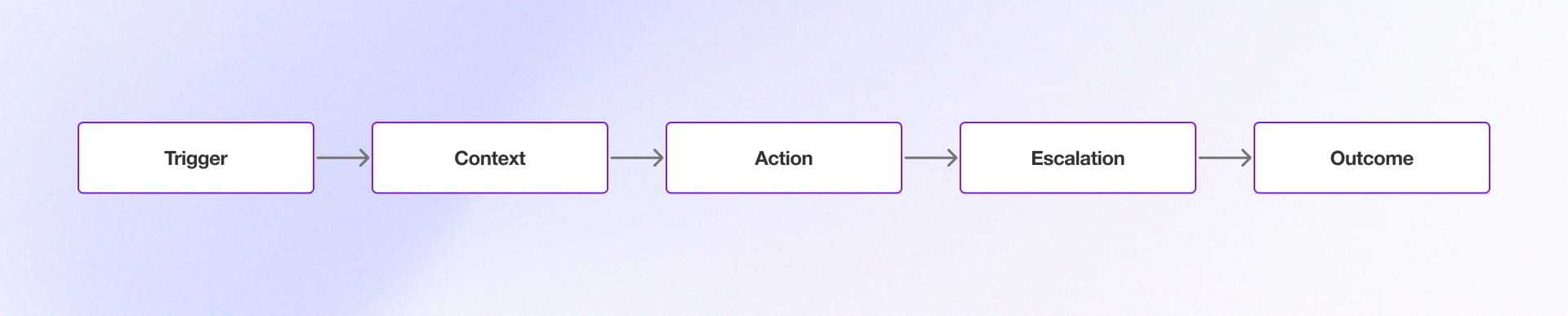
Map the workflow before opening the tool:
- What triggers the interaction? (A Teams message, a form submission, an email, a scheduled event)
- What information does the agent need? (A SharePoint doc, a CRM record, a policy database)
- What action does it take? (Answers, submits, routes, auto-approves)
- What happens when it can’t resolve it? (Escalation to a human, with context pre-filled)
3. Connect Enterprise Knowledge and Data Sources
Connected enterprise knowledge is what makes Copilot Studio agents operationally reliable. The quality of the agent usually depends on the quality of the connected systems, knowledge repositories, and business data behind it.
Most organizations connect agents with:
- SharePoint knowledge bases
- Dynamics 365
- CRM systems
- HR platforms
- Internal SOPs and policy repositories
It’s grounding the agent in enterprise-approved data so responses, actions, and workflow decisions stay accurate across operational scenarios.
4. Build Conversation Flows and Agent Actions
This is where operational workflows start turning into actual agent behavior. Businesses define conversation topics, workflow actions, approvals, escalation paths, and automated responses based on the operational process being improved.
Most successful deployments start smaller than expected. Focused Microsoft Copilot Studio agents handling five operational scenarios usually perform better than a broad deployment that tries to automate everything at once.
5. Integrate Automation Through Power Automate
An AI agent becomes far more valuable when it can move workflows forward instead of only responding to questions.
Power Automate helps Copilot Studio AI agents:
- route approvals
- create tickets
- trigger notifications
- update CRM records
- move documents across workflows
- escalate operational exceptions automatically
That’s where repetitive coordination work starts disappearing quietly in the background. Explore our main page to learn more about how Power Automate Services work.
6. Test Against Real Operational Scenarios
What to test:
- Scenario coverage – run the top 20 real scenarios expected. Does the agent understand the intent and take the right action?
- Edge cases – what happens when a request is out of scope? It should follow guardrails or escalate clearly.
- Action execution – test every workflow, trigger, and system action. Does the agent complete it correctly?
- Escalation paths – does the right person receive the handoff with the right context?
- Accuracy – are responses and actions aligned with source documents and business rules?
Ready to Explore Building AI Agents with Copilot Studio? Rishabh Software Can Help You Get Started
New to Copilot Studio? Our experts are here to guide you and help you identify what you and your business need.
As a Microsoft Solution Partner, At Rishabh Software, we help businesses build fully functional AI agents using Copilot Studio, Power Platform Services, Microsoft Power Apps, and connected Microsoft services. From high-volume self-service support and approval workflows to enterprise knowledge retrieval and operational automation, our teams help transform repetitive processes into AI-driven workflows.
Whether you’re planning internal support agents, workflow automation, or enterprise self-service experiences, our Microsoft experts help businesses move from AI experimentation to practical operational adoption.
Frequently Asked Questions
Q: What systems can Microsoft Copilot Studio AI agents connect with?
A: Microsoft Copilot Studio AI agents can connect with Microsoft 365, Teams, SharePoint, Dynamics 365, Dataverse, Power Automate, websites, customer portals, and external business applications through APIs and pre-built connectors. This enables organizations to automate workflows and access information across multiple systems from a single AI agent.
Q: What business processes can be automated using Microsoft Copilot Studio AI agents?
A: Organizations use Copilot Studio AI agents to automate employee support, IT helpdesk requests, document approvals, knowledge retrieval, customer service interactions, sales workflows, and other repetitive business processes across departments.
Q: Can Microsoft Copilot Studio AI agents access enterprise knowledge and documents?
A: Yes. AI agents can be connected to enterprise knowledge sources such as SharePoint, Dataverse, internal documentation repositories, websites, and business systems. This enables agents to provide context-aware responses based on approved organizational information.