Xamarin support from Microsoft ended on May 1, 2024. If your enterprise still runs Xamarin.Forms apps, you now carry growing security, compatibility and app store risk. .NET Multi-platform App UI (.NET MAUI) is Microsoft’s current cross-platform UI framework and the official successor to Xamarin.Forms.
Here’s what changes with that: Xamarin.Forms split your app across a multi-project structure. .NET MAUI puts it all in one codebase which means one place to build, one place to maintain. The result – your team spends less time managing complexity and more time shipping features.
This blog post explores the essential steps for a successful Xamarin.Forms to .NET MAUI migration. It also explains the main advantages of .NET MAUI and provides practical guidance for a smooth transition.
Why Do You Need to Migrate from Xamarin to .NET MAUI?
.NET MAUI is the evolution of Xamarin.Forms and the recommended path for cross-platform development. Understanding the key differences and comparison of Xamarin vs .NET MAUI is crucial for businesses and developers to realize the undeniable benefits of pursuing migration. There are several compelling reasons to migrate:
- End of support is permanent
Xamarin SDKs, including Xamarin.Forms, stopped receiving updates, security patches, and technical support on May 1, 2024. Apps left on Xamarin are vulnerable to security and compatibility risk. - Long-term platform alignment
Microsoft has unified its development platforms under the modern .NET ecosystem, which supports ongoing updates, current tooling and access to the latest framework capabilities. - Unified development
A single project structure replaces the multi-project approach commonly used with Xamarin.Forms to simplify development and maintenance. - Access to latest features
The framework gives easy access to newer .NET features and capabilities unavailable in Xamarin. - Improved Developer Experience
Smooth integration with Visual Studio 2026 and the latest .NET tools makes day-to-day work faster and easier. Building, debugging, Hot Reload, and XAML Live Preview; all work more reliably, so you spend less time waiting and more time iterating on the actual app. - Wider platform support
As the successor to Xamarin, .NET MAUI extends beyond mobile to desktop platforms such as Windows and macOS through Mac Catalyst. It’s part of the open-source .NET ecosystem and Microsoft’s current cross-platform UI stack. - Blazor Hybrid option
Teams with web skills can embed Razor and HTML UI inside native .NET MAUI apps; a capability Xamarin did not provide.
Xamarin to .NET MAUI Migration: Pre-Migration Checklist
Here’s a migration readiness checklist that will help you ensure an efficient .NET MAUI migration, which allows you to take full advantage of the new capabilities and improved performance of the modern framework:
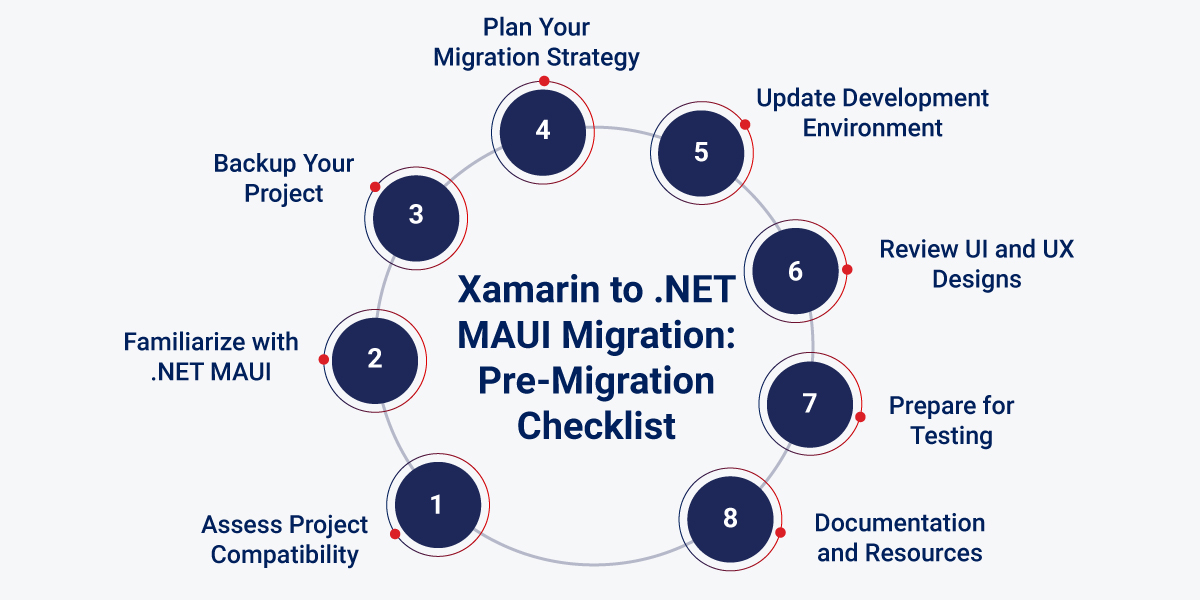
Assess Project Compatibility
Review the Xamarin.Forms app from top to bottom. Flag custom renderers, platform-specific logic, and third-party packages first. Confirm the app sits on a stable Xamarin.Forms 5 base, then check every dependency for a MAUI version or replacement. Visual Studio analyzers and migration tools can help identify the bottlenecks early.
Familiarize yourself with .NET MAUI
Learn the pieces that change the most: single-project structure, handlers, MauiProgram, and the newer app startup flow. If your team understands those pieces first, the migration moves faster and breaks less often.
Backup Your Project
Back up the full solution and keep it under Git. A clean rollback path saves time when a change touches multiple projects.
Plan Your Migration Strategy
Pick a direct cutover or a phased move. Larger apps usually benefit from stages. Move shared code first, then UI, then platform-specific pieces. That keeps risk low and gives you room to test each step.
Update Development Environment
Use a current supported Visual Studio version with the .NET MAUI workload installed. Check that the Android, iOS, Windows and Mac SDKs you need, are already on the machine.
Review UI and UX Designs
Audit the UI with a migration lens. Some Xamarin layouts map cleanly to MAUI. Others need cleanup. Custom renderers and layout-heavy screens often need the most work.
Prepare for Testing
Set up emulators and physical devices for every target platform. Then align your automated tests with the new MAUI project structure so you catch regressions fast.
Documentation and Resources
Keep Microsoft’s official docs open while you work. The support policy and migration pages help you verify target frameworks, layout behavior and API changes before you commit to them.
Best Ways for Seamless Migration from Xamarin to .NET MAUI
There are two primary methods to migrate Xamarin to MAUI seamlessly. Let’s give you an overview of each of these:
Manual Migration
Start with a new MAUI project and move the app into it piece by piece. This takes more time, but it gives you control over structure, dependencies and code quality. Complex apps usually need this path because they carry too much platform-specific logic to move blindly.
Automated Migration
Microsoft now recommends using the GitHub Copilot modernization agent, available in Visual Studio, as the main tool for upgrading Xamarin.Forms apps to .NET MAUI. It analyzes your project, creates a step-by-step migration plan and can apply many of the common code and project file changes automatically. You can review and accept each change as it goes. The older .NET Upgrade Assistant still works and can help with the initial project conversion, but it’s now considered a legacy tool.
A Step-by-Step Roadmap for Xamarin to .NET MAUI Migration
This roadmap gives enterprise teams a clean path from Xamarin to .NET MAUI without turning the app into a mess halfway through.
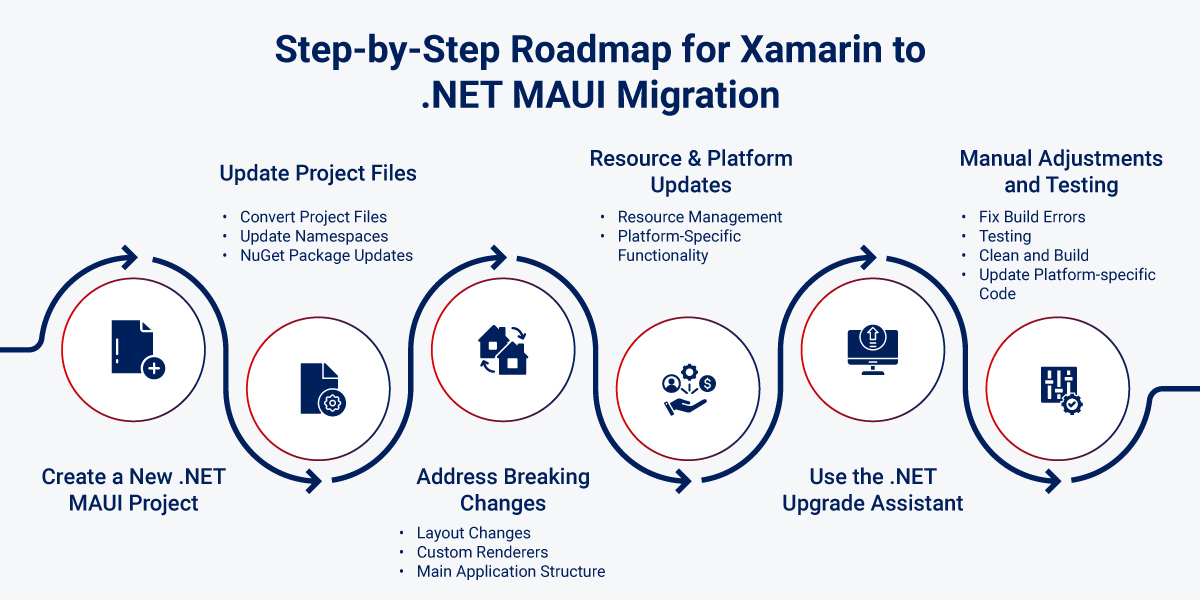
Step 1: Create a New .NET MAUI Project
Start by measuring the app. Check the size of the codebase, the number of custom renderers, and the dependencies that sit in the way. Begin by creating a new .NET MAUI project with the latest supported SDK so you can use it as the target structure.
Step 2: Update Project Files
- Convert Project Files
Move the solution to SDK-style project format and set <UseMaui>true</UseMaui>. Update the TargetFrameworks to the latest supported .NET MAUI monikers for your target version, such as net10.0-android, net10.0-ios, net10.0-maccatalyst, and the correct Windows TFM. Confirm the exact values in Microsoft’s docs before you change anything. - Update Namespaces
Replace Xamarin.Forms references with the matching Microsoft.Maui and Microsoft.Maui.Controls namespaces. Change the XAML namespace from http://xamarin.com/schemas/2014/forms to http://schemas.microsoft.com/dotnet/2021/maui. Update Xamarin.Forms.Xaml to Microsoft.Maui.Controls.Xaml. - NuGet Package Updates
Replace Xamarin.Forms packages with MAUI equivalents where they exist. If you used DevExpress.XamarinForms.Charts, move to DevExpress.Maui.Charts. Remove Xamarin.Forms and Xamarin.Essentials packages once the MAUI versions cover the same need.
Step 3: Address Breaking Changes
.NET MAUI introduces several breaking changes compared to Xamarin.Forms. The biggest shifts usually show up here:
- Layout Changes
StackLayout gives way to VerticalStackLayout and HorizontalStackLayout. RelativeLayout still exists in the compatibility namespace, but Microsoft keeps it outside the default layout system. Use Grid when you can. - Custom Renderers
Handlers and mappers now lead the way. They replace a lot of the old renderer work and keep customization cleaner. - Main Application Structure
Update MainActivity and AppDelegate to match MAUI conventions. Use MauiProgram to bootstrap the app. A fresh MAUI project makes this easier to map. - Startup Pattern
Use CreateWindow(IActivationState) as the modern startup pattern instead of depending on old Xamarin.Forms startup patterns. In current MAUI versions, Microsoft recommends initializing the app window through CreateWindow rather than setting MainPage directly
Step 4: Update Resource Management and Platform-Specific Functionality
- Resource Management
Use MAUI’s project-based asset setup for images, fonts, and other resources. Do not treat Resource.designer.cs like a direct replacement target. - Platform-Specific Functionality
Replace DependencyService with built-in dependency injection and service registration in MauiProgram. Use handlers for UI changes. Xamarin.Essentials APIs now sit inside MAUI, so you do not need the old package in most cases.
Step 5: Use the .NET Upgrade Assistant
Use migration tooling where it saves time, then review every change by hand. Tooling helps with conversion. It does not make judgment calls for you. Microsoft’s current guidance still centers on upgrade docs plus tooling support.
Step 6: Manual Adjustments and Testing
After the tool pass, handle the parts that always need a developer’s eye:
- Fix Build Errors
Open the project in Visual Studio and clear build errors as they appear. Ambiguous references and missing dependencies show up often. - Testing
Run the app on iOS, Android, Windows, and macOS. Check both startup and runtime behavior. - Clean and Build
Rebuild often. Old artifacts hide new problems. - Update Platform-specific Code
Review native code paths and align them with current MAUI APIs and patterns.
Benefits of Xamarin to .NET MAUI Migration
Migrating Xamarin to MAUI offers several significant benefits that enhance the development experience and improve app performance. Here are the key advantages:
- Single Project Structure
One project handles all platforms, which cuts down overhead and keeps the app easier to maintain. - Modern Architecture Patterns
MAUI supports MVU and Blazor patterns alongside MVVM and RxUI, so teams can choose the shape that fits the app. - Enhanced Performance
The current .NET stack brings better resource handling, rendering improvements, and steady runtime gains. That usually shows up in startup speed and responsiveness. - Blazor Hybrid
Razor components inside a native shell give web-heavy teams a direct route into mobile and desktop apps. Xamarin never had that path. - Modern Features and Tools
Better tooling, Hot Reload, stronger docs, and ongoing platform updates make daily development faster. - Reduced Maintenance Overhead
A supported platform lowers the cost of future updates, fixes, and SDK changes. - Cross-Platform Code Sharing
Shared code keeps business logic and much of the UI in one place, which cuts duplication and reduces drift.
Why Choose Us as Your Trusted Partner for .NET MAUI Migration?
Rishabh Software is well positioned to support your .NET MAUI migration. With years of experience, technical expertise, and a proven track record, our team has extensive experience with cross-platform app development including work with Xamarin.Forms and related Xamarin stack components across multiple industries.
We’ve helped businesses create mobile & desktop applications that work seamlessly across different platforms. As your trusted .NET MAUI development company, we can provide custom development, hassle-free migration, testing & QA and ongoing maintenance support to meet your business needs.
Our team can help you plan your Xamarin.Forms to .NET MAUI migration, identify the code changes your app needs and validate the result after migration. That includes project updates, namespace changes, UI adjustments and testing across target platforms.
We can further enhance your overall business operations with advanced integration capabilities and expertise in services such as ASP.NET, .NET Core, Azure, SharePoint, Data Analytics, Power BI, and Dynamics 365 for reporting, integration, and business operations.
Frequently Asked Questions
Q: What happens if I do not migrate? Will my Xamarin app still work after end of support?
A: Yes, your Xamarin app will still work on users’ phones and stay available in the App Store and Google Play for now. However, Microsoft has stopped giving updates, bug fixes and security patches after May 1, 2024. Due to this over time, issues will appear. You may not be able to update the app in the stores and security issues won’t get fixed. So, it works today, but it’s neither safe nor recommended to stay on Xamarin in the long haul.
Q: What are the Main Challenges When Migrating from Xamarin to .NET MAUI?
A: Most teams hit the same four issues: project structure changes, API and namespace updates, layout differences, and the move from renderers to handlers. Third-party packages and platform-specific code often need manual cleanup.
Q: What Tools are Available for Xamarin to .NET MAUI migration?
A: Microsoft offers migration docs and tooling support. The .NET Upgrade Assistant still helps in some workflows, but most teams need to review the output and finish the job by hand.
Q: How Does the Performance of MAUI Apps Compare to Xamarin Apps?
A: MAUI apps usually perform better because they sit on a newer .NET base and use newer rendering and resource handling patterns.
Q: How long does a typical Xamarin to .NET MAUI migration take?
A: It depends on app size, custom renderers, dependency count, and test coverage. Small apps may take a few days or weeks. Large, complex enterprise apps often take several weeks or months.
Q: Can I migrate incrementally or does it have to be done all at once?
A: You can migrate in stages, and most larger teams should. Move shared code first, then UI, then platform-specific parts. That keeps the app shippable during the transition.