
Fraud patterns change faster than most policies can keep up, and manual checks slow things down right when revenue teams need speed. Meanwhile, the proof you need for audits gets scattered across emails, spreadsheets, shared drives, and ticket threads, so when an audit hits, it turns into a scavenger hunt. And even after onboarding due diligence is done, risk can still change, but most teams don’t keep monitoring it.
Fenergo’s latest research shows onboarding delays are now a major churn driver, with 70% of financial institutions worldwide losing clients in the past year, the highest level on record. And for teams that handle fraud and downstream disputes, LexisNexis reports that merchants spend an average of $4.60 for every $1 lost to fraud. This data shows that fixing issues after the fact is far more expensive than preventing them during on-boarding.
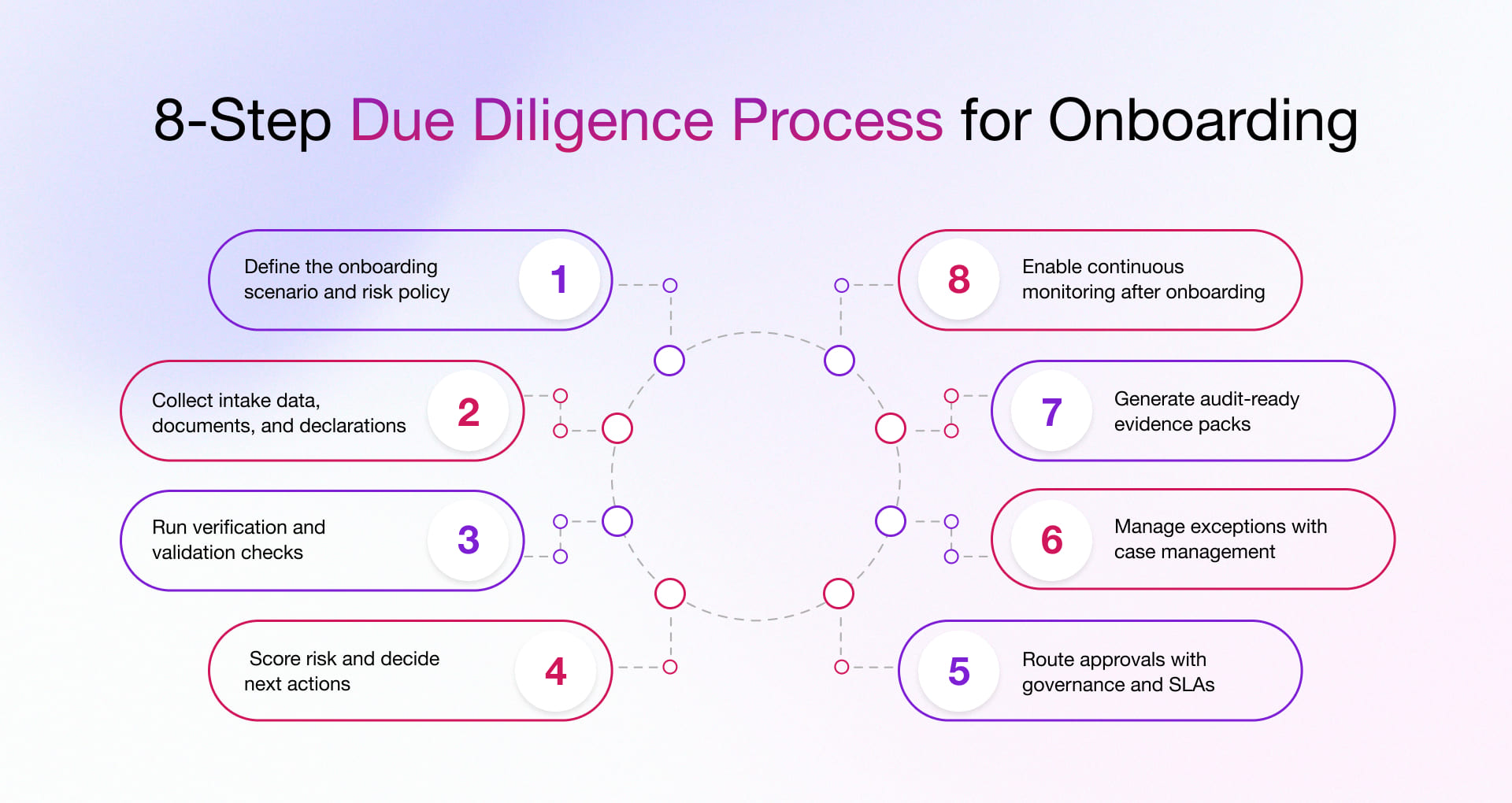
This blog breaks down a repeatable due diligence process you can use to validate customers, vendors, and partners across industries. It also explains why onboarding programs fail in the real world, then walks through an 8-step workflow that standardizes decisions and adds continuous monitoring, so risk is rechecked when something changes. Finally, it shows how Microsoft Power Platform helps you automate the process without losing control, traceability, or audit readiness and outlines a phased implementation approach that delivers value fast.
How Does the Due Diligence Onboarding Process Work?
The process of due diligence is a repeatable sequence of steps to verify, validate, approve, and monitor an entity, before and after they’re onboarded. It’s like building a case file where you’re not just recording the outcome; you’re capturing the roadmap you took to get there.
In practice, due diligence process steps typically cover:
- Data intake (who they are, what they do, where they operate, what you’ll transact)
- Verification and validation (documents, registries, internal lists, policy rules, third-party checks where relevant)
- Risk scoring (tiering based on your risk appetite)
- Approvals (governed decision-making, including maker-checker controls)
- Exceptions (structured case handling, not email archaeology)
- Evidence packs (audit-ready proof)
- Continuous monitoring (because risk doesn’t freeze at Approved)
It applies to customers, vendors, suppliers, partners, merchants, distributors, contractors, providers, and any relationship where a bad onboarding decision becomes a future incident.
At Rishabh Software, we design due diligence workflow solutions on Microsoft Power Platform to ensure your process aligns with your policies, systems, and risk appetite.
Now that the concept is clear, the real question is: why do so many onboarding programs still lead to delays, inconsistent decisions, and audit gaps? Let’s unpack the failure points you can actually fix.
Why Most Onboarding Due Diligence Processes Fail?
Most onboarding teams don’t fail due to a lack of effort. They fail because the system behaves like an unmanaged inbox. Every request shows up in a different format, everyone handles it their own way, and nothing moves forward the same way twice.
Here are the most common breakdowns, laid out as Problem → Mechanism → Solution so you can spot what’s happening and fix it.
- Inconsistent checklists across teams or regions: One office clears an entity in a day. Another office takes three weeks for the same type of entity. That gap usually comes from people working off different “versions of the truth.” One team follows the latest doc. Another follows last quarter’s spreadsheet. A third relies on what someone remembers. Bring the checklist into the workflow itself. The right due diligence steps should appear automatically based on entity type, region, and risk level, and the process should not move forward until the required checks and decision notes are in place.
- Manual routing, unclear ownership, SLA misses: Requests stall because everyone assumes someone else has it. The handoff happens in email and chat, so nobody has clear ownership, nothing has a timeline, and there’s no automatic escalation when work sits too long. Instead, put every onboarding request into a queue with a named owner, a due date, and a clearly visible next step. When the clock runs out, the workflow escalates or reassigns automatically.
- Exceptions handled in email with no traceability; High-risk cases get resolved, but later nobody can explain what happened or why. The details live in long threads, scattered attachments, and side conversations. The decision exists, but the story behind it disappears. Handle exceptions like real cases. Keep investigation steps, evidence requests, remediation tasks, and final outcomes in one centralized location with standard resolution labels and a complete timeline.
- Evidence stored in multiple places with no unified audit trail: When an audit hits, the team starts hunting. Screenshots here, PDFs there, approvals somewhere else. Even if the work was done correctly and on time, the proof is scattered, and so it takes forever to assemble. Record evidence inside the onboarding log and generate an evidence pack on demand. It should include checks completed, approvals, decision rationale, timestamps, and documents in one clean export.
- No plan for continuous monitoring after onboarding: The file closes and never opens again, even when risk changes. Teams treat onboarding like a one-time gate. Meanwhile, licenses expire, ownership changes, incidents happen, and nobody gets prompted to re-check. Add scheduled reviews and event-based triggers that reopen the case when something changes. The process can require re-approval, add conditions, or escalate when risk increases.
If these failure modes feel familiar, you’re ready for the fix! A repeatable 8-step due diligence workflow that you can apply to customers, vendors, and partners and automate when you’re ready.
Due Diligence Process for Onboarding: Step-By-Step Workflow
This is a practical model you can apply across industries. Picture these due diligence steps like an assembly line for risk decisions: each station has a clear purpose, clear inputs, and a clear output so that quality remains consistent even when volume spikes.
You can apply these due diligence stages to every onboarding program, even if the checks vary by industry.
Step 1: Define the onboarding scenario and risk policy
Start by naming the scenario precisely. “Vendor onboarding” is too broad; “high-spend logistics carrier in Region X” is actionable.
Define:
- Onboarding type: customer, vendor, partner (and subtypes like merchant, reseller, contractor)
- Policy rules + required checks (by region, product/category, spend/volume)
- Risk tiers + escalation triggers (Low/Medium/High; Enhanced Due Diligence)
Example: A marketplace seller in a restricted category routes automatically to enhanced checks and a senior approver.
Step 2: Collect intake data, documents, and declarations
Treat intake like pouring concrete: if it’s weak at the foundation, everything built on top cracks.
Use digital forms and guided uploads to capture:
- Required data (and enforce format rules)
- Documents (with metadata like expiry date and doc type)
- Declarations, disclosures, and consent where required
Completeness checks here prevent “approval ping-pong” later.
Step 3: Run verification and validation checks
This is where you separate “they said” from “we verified.”
Your checks can include:
- Document validation (expiry, mandatory fields/pages, authenticity signals)
- Registry checks (business registration, tax/VAT status)
- Internal checks (duplicates, blacklist hits, prior incidents)
- Policy checks (insurance threshold met, certifications present)
Where applicable, connect third-party data sources, but keep human review for anything ambiguous or high-impact. The goal is a balanced model that automates routine decisions with clear signals and escalates cases that carry real uncertainty.
Step 4: Score risk and decide next actions
Risk scoring shouldn’t be a black box. When someone asks, “Why did we escalate this vendor?” the answer must be explainable in plain language.
Define:
- Scoring factors (geography, category, history, check results, volume)
- Weights and thresholds aligned to your risk appetite
- Decision paths: approve, approve with conditions, escalate, reject
Explainability matters because it reduces disputes, speeds approvals and strengthens audit posture.
Step 5: Route approvals with governance and SLAs
This is where governance moves from a document to a decision.
Implement:
- Role-based approvals and maker-checker separation of duties
- SLA timers (with escalation and reassignment)
- Structured decision reasons (dropdown codes + mandatory comments where needed)
Maker-checker essentials (auditor-friendly):
- Maker cannot self-approve (permissions enforced)
- Approver identity + timestamp captured
- Overrides require justification + higher approval tier
Step 6: Manage exceptions with case management
Exceptions are feedback from the system. Capture them as cases so they turn into improvements.
A strong exception model includes:
- Investigation queues (compliance, ops, legal, procurement)
- Remediation tasks (who requests what, by when)
- Evidence requests and tracked submissions
- Standardized outcomes (approved with conditions, rejected with reason)
Capture questions, answers, and decisions in the case record so the full context travels with the work.
Step 7: Generate audit-ready evidence packs
This is the “black box recorder” of onboarding: it tells the full story after the fact, even when staff have moved on or the situation has changed.
Audit trail essentials should capture:
- Submitted data snapshot + version history (what changed, and when)
- Checks executed (type, source, results, timestamps)
- Document metadata (who uploaded, classification, expiry)
- Decisions (who approved, when, why, what conditions)
- Exceptions (case timeline, tasks, outcomes)
- Access/change logs (who viewed/edited, role, time)
- Retention markers (policy-based retention; holds if required)
An evidence pack should export cleanly as a PDF or ZIP and read clearly to anyone outside the team, including internal audit, a regulator or a partner running their own review.
Step 8: Enable continuous monitoring after onboarding
If onboarding is the ID check at the door, monitoring is the security camera. It keeps watch and flags unusual activity.
Use:
- Periodic reviews based on risk tier (e.g., quarterly high-risk, annual low-risk)
- Event-triggered re-checks
- Re-approvals and workflow resets when risk shifts
Common monitoring triggers:
- Expiry triggers (insurance, certifications, licenses with 30/60/90-day alerts)
- Material changes (ownership, address, bank details)
- Incident triggers (chargeback spikes, fraud flags, safety/quality incidents)
- Threshold triggers (spend/volume crosses limits; route changes for critical lanes)
- Policy triggers (category reclassification; newly restricted services)
If you’re thinking, “We do most of this, just not consistently,” that’s exactly the point. We will map your current on boarding process into this model and build it as a working Power Platform workflow, so the process runs the same way every time. The workflow enforces the steps by design, not by memory.
Now that the process is clear, the next question is practical: how do you implement this without ripping and replacing your systems? That’s where Power Platform fits.
How Microsoft Power Platform Enables Due Diligence Onboarding Automation?
Power Platform works well for onboarding because it’s adaptable. You can model your policy logic, your approvals, and your evidence requirements without forcing every team into a rigid, cookie-cutter tool.
Power Apps and Power Pages for intake and reviewer experiences
Use Power Apps for your internal teams and Power Pages for external intake. This blend gives you a flawless onboarding experience that works for both sides. External users get guided forms and secure document uploads, while internal teams get role-based screens that cut down on effort and help them make faster, more consistent decisions.
- Guided onboarding for external users through Power Pages, with validation at the source
- Role-based reviewer experiences in Power Apps for compliance, operations, and approvers
- Cleaner submissions, fewer missing fields, and faster first-pass decisions
If you want to digitize your workflows and drive agility across the board, explore our Microsoft Power Apps development services.
Power Automate for workflow orchestration
If Power Apps is where people do the work, Power Automate is what keeps it moving. It assigns, notifies, escalates, and enforces the rules in the background.
- Routing, approvals, SLA tracking, escalations, notifications
- Trigger-based workflows for periodic reviews and re-checks
- Fewer bottlenecks and fewer “stuck in email” approvals
We excel at implementing Power Automate workflows that reduce manual follow-ups and keep approvals moving. Explore our Microsoft Power Automate services to know how!
Dataverse and SharePoint for a single source of truth
Use Dataverse as your system of record for onboarding. Keep the structured details there, like the entity profile, risk rating, decisions, approvals, and timestamps. Store the files in SharePoint, like IDs, contracts, certificates, and supporting documents, and link each one back to the right Dataverse record.
That keeps the onboarding record clean, searchable, and easy to report on, while the documents stay in the right place for file management, retention and access control.
- Dataverse holds onboarding records, decisions, approvals, and audit history
- SharePoint stores documents and evidence files, linked to the Dataverse case
- One case record shows who did what, when it happened, and what evidence supported it.
Leverage our SharePoint development services to create connected intranets and portals that scale across domains. We support workflows, integrations, AI agents and content experiences designed for how your teams work.
Power BI for operational and risk reporting
Power BI turns process exhaust into operational intelligence, including cycle time, SLA adherence, exceptions and risk trends that leadership can actually act on.
- Cycle time, throughput, exception rates, risk distribution
- Bottleneck visibility by team, region, entity type, risk tier
- Dashboards that support continuous improvement
The same process looks different across industries and that’s exactly why a configurable workflow beats a one-size-fits-all checklist. If you want to turn your onboarding and workflow data into dashboards your leadership can act on, explore our Microsoft Power BI consulting services.
Why Choose Rishabh Software for Due Diligence Onboarding?
You don’t just need automation. You need defensible automation built around your policies, your risk appetite, and your audit reality.
Here’s how we approach it:
We design workflows around your onboarding reality
We start from scenarios (entity type + risk tier +x region), then build routing, approvals, and exceptions around actual operating conditions and not idealized flowcharts.
We make audit and evidence a built-in outcome
Audit trails, evidence packs, and traceability aren’t add-ons. They’re requirements and we design them into the data model and workflow from day one.
We enable continuous monitoring after onboarding
Because risk evolves. We help define triggers, periodic reviews, and re-approval logic so “Approved” doesn’t mean “Ignored.”
We build on Microsoft Power Platform to accelerate delivery
Power Apps, Power Automate, Dataverse, and Power BI are used with governance so the solution is scalable and supportable. See how Rishabh Software supports Microsoft platforms and solutions.
We measure success with operational metrics
Cycle time, SLA adherence, exception rates, and risk trend visibility are the signals that tell you what’s working, what’s breaking, and where to improve next. When you track them, your onboarding program gets better week by week.
Success Story: Onboarding Due Diligence Workflow for A Leading Bank
Enterprise onboarding is where small process flaws become big operational risks. This financial organization was onboarding customers, vendors, and partners at high volume, but the process was slowing revenue teams, creating inconsistent decisions across teams, and making audits painful because evidence was spread across tools. They needed a faster, standardized due diligence process with strong governance, clear SLAs, and audit-ready proof built in.
Overview
Rishabh Software was engaged to map existing onboarding journeys, identify control gaps, and build a scalable Power Platform workflow to enforce policy, approvals, and evidence requirements without disrupting core systems. Learn how we build solutions on Microsoft Power Platform.
Challenges
Routing bottlenecks, poor visibility, scattered evidence, inconsistent risk tiering, and weak reporting.
What we delivered on Power Platform
We implemented scenario-based onboarding workflows by entity type and risk tier, then operationalized them with:
- Verification and validation steps with automated routing
- Case management for escalations, exceptions, and remediation
- Centralized audit trail and exportable evidence packs
- Dashboards for SLA performance, throughput, and exception trends
- Periodic reviews and trigger-based re-checks for continuous monitoring
Outcomes
Faster decisions, reduced rework, improved audit readiness, and better operational visibility.
If you’re ready to turn onboarding into a system that scales, then share your current process, and we’ll send back a short evaluation matrix that highlights the gaps, the quickest wins, and a practical plan to launch your first automated due diligence onboarding workflow.
Frequently Asked Questions
Q: What is included in verification and validation during onboarding?
A: Verification and validation typically include document checks (completeness and expiry), registry checks (business legitimacy), internal checks (duplicates and watchlists), policy checks (required thresholds), and human review for any flagged or ambiguous cases.
Q: What should an audit trail include for onboarding due diligence?
A: At minimum: submitted data snapshot, checks executed and results, document metadata, approval chain with timestamps, decision reasons, exception case timeline, change history, and access/change logs, plus retention markers aligned to policy.
Q: What outcomes can you expect from a standardized onboarding process?
A: When onboarding is engineered like a system, you see improvements that show up in both compliance and revenue operations.
You can typically expect:
- Faster onboarding cycle times through automation and exception-based review
- Reduced rework via enforced steps and structured intake
- More consistent decisions with policy-driven routing and reasons
- Audit readiness through centralized evidence and traceability
- Better visibility through dashboards for bottlenecks and SLA performance
The next logical step is implementation, so you get value fast. Here’s a phased approach designed for real enterprise constraints.
Q: How does continuous monitoring work after onboarding?
A: It combines periodic reviews (based on risk tier) with event triggers (expiry, material changes, incidents, threshold breaches). When something changes, the workflow runs the checks again, opens a case if it needs extra review and can ask for re-approval or apply conditions before the relationship continues.
Q: How do onboarding workflows differ across industries?
A: The overall structure stays the same, but the checks and triggers change depending on the risk profile. AdTech focuses on fraud signals and policy compliance. Manufacturing prioritizes certifications, quality, and supplier readiness. FinTech leans on risk-tiered reviews and strong evidence packs. HealthTech requires credential-style validation and traceability. Logistics depends heavily on insurance, compliance documents, and incident triggers. Retail is all about seller legitimacy, category rules, and managing lots of edge cases at scale.