As organizations scale across geographies and hybrid work models, maintaining cohesive communication and productive collaboration becomes difficult. For many, the intranet has become the quiet casualty of this growth: neglected, scattered, and increasingly disconnected from how people work. The result is familiar to any HR leader or operations head; information buried in email threads, policies that employees cannot locate, and new hires left to navigate a digital workplace with no clear starting point.
Therefore, whether implementing a new intranet or modernizing an existing one, SharePoint remains the most strategically sound choice. As a Microsoft-Certified Cloud Solution Provider, we work with mid-sized to large enterprises expecting more than a content repository like a governed, intelligent digital workplace. That is precisely what a well-implemented SharePoint intranet delivers.
This blog outlines the core SharePoint Intranet portal benefits of not just what the platform does, but what enables your organization to become: faster, better connected, and built for sustained growth.
The Role of SharePoint Intranet in Digital Workplace
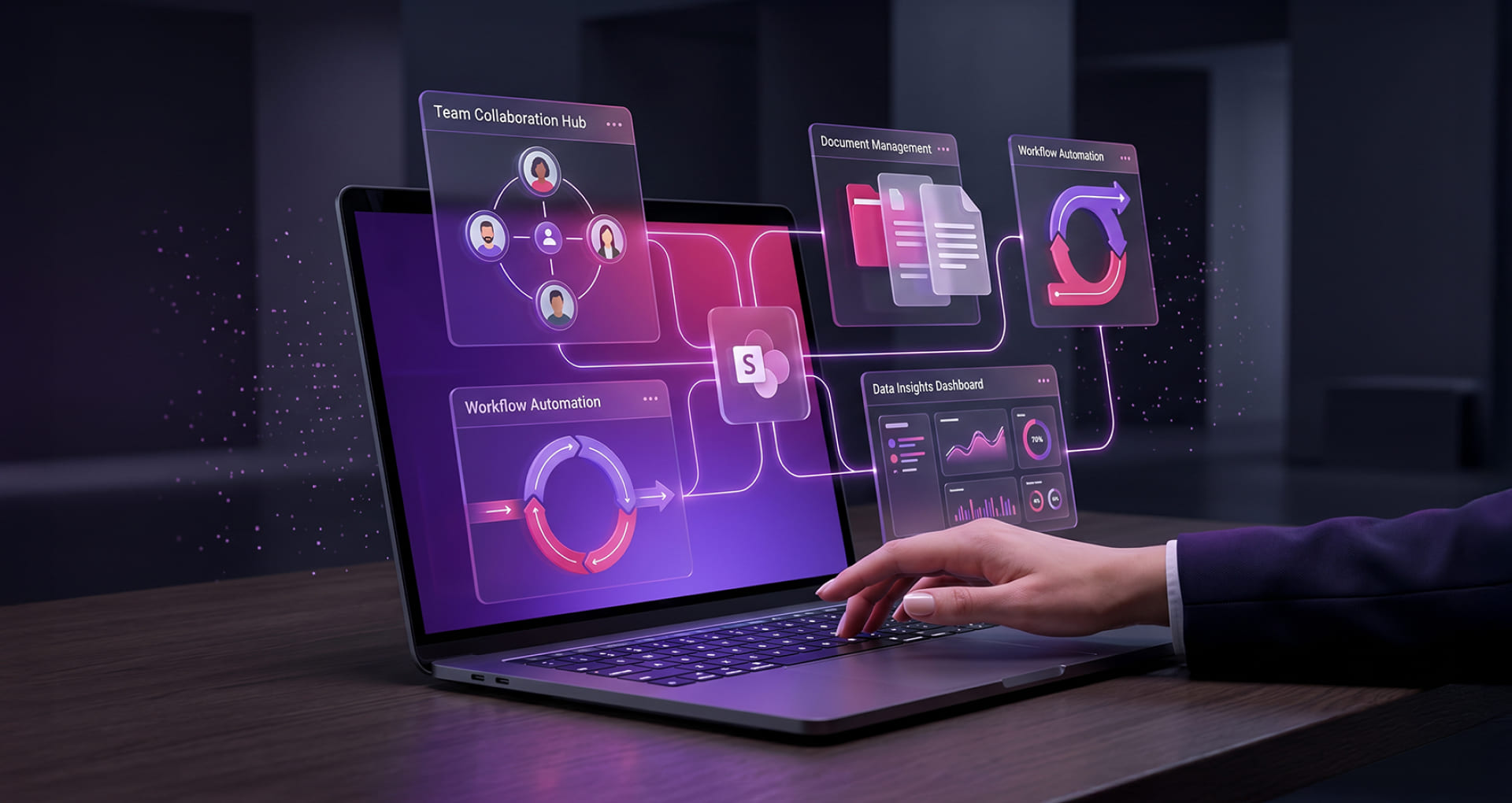
Organizations rely on complex tools to drive communication, collaboration, and employee experience. Yet without a unifying platform, this ecosystem quickly becomes scattered, creating redundancy and friction. SharePoint Intranet resolves this by serving as the connective layer: bringing together people, content, and processes within a well-governed, enterprise-grade environment.
- Centralized Content Management Hub: SharePoint Intranet functions as the single source of truth for organizational knowledge from policies and procedures to department-specific documentation. It eliminates duplication, enforces version control, and ensures that every employee, regardless of role or location, accesses accurate and up-to-date information.
- Digital Communication Backbone: SharePoint enables structured, organization-wide communication through targeted news, announcements, and leadership updates. Whether your workforce spans three cities or thirty countries, leadership messaging reaches employees in a timely, consistent, and measurable way.
- Integration Layer Across Microsoft 365: SharePoint does not operate in isolation; it integrates natively with Microsoft Teams, Outlook, Viva, and the broader Microsoft 365 ecosystem. This creates a unified digital experience that eliminates tool-switching, reduces silos, and ensures continuity across every touchpoint in the employee journey.
- Collaboration Enablement Platform: Beyond document storage, SharePoint actively enables collaboration through shared team sites, real-time co-authoring, and deep integration with Microsoft Loop and Whiteboard. Teams can ideate, execute, and iterate all within a familiar, governed environment.
- Employee Experience Platform (EXP) Foundation: When deployed alongside Microsoft Viva, SharePoint becomes a powerful employee experience layer delivering role-based, personalized content that supports onboarding, continuous engagement, and internal communication tailored to each employee’s context and function.
- Process and Workflow Automation Layer: SharePoint eliminates manual bottlenecks by enabling intelligent workflow automation across functions from HR approvals and compliance signoffs to cross-departmental request management. The result is leaner operations and more time for meaningful work.
- Governance and Compliance Framework: SharePoint provides robust, built-in governance controls including role-based access permissions, content lifecycle management, and audit trails enabling organizations to manage information responsibly while meeting regulatory and internal compliance obligations.
- Knowledge Discovery and Intelligence Layer: Powered by Microsoft Search and AI-driven content recommendations, SharePoint surfaces the right information at the right moment. Employees spend less time searching and more time having a direct impact on productivity and informed decision-making.
- Scalable Platform for Growth and Modernization: Whether you are migrating from an on-premises to online or expanding a cloud-first environment, SharePoint scales with your organization. Its architecture supports phased modernization without disruption giving enterprises the agility to grow without starting over.
SharePoint Intranet Portal Benefits for Modern Organizations
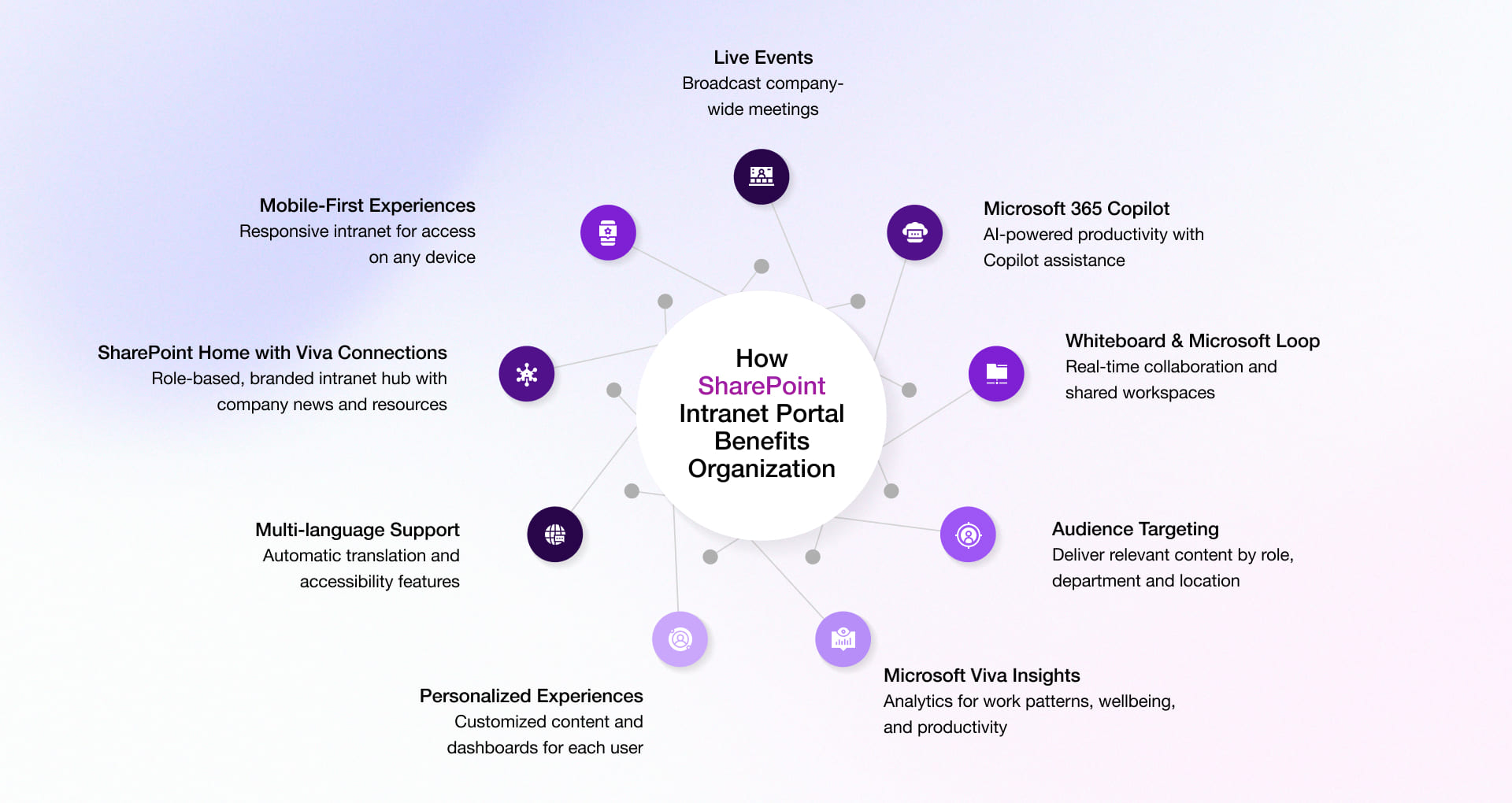
The benefits of SharePoint Intranet extend well beyond a communication hub. For HR leaders and digital workplace teams, it offers a measurable return across employee experience, operational efficiency, and organizational alignment. Below are the nine key capabilities that distinguish SharePoint as the preferred intranet platform for modern enterprises.
1. Mobile-First Intranet Experiences
Without a mobile-optimized intranet, employees in hybrid, field, or frontline roles remain disconnected.
SharePoint Intranet Portal benefits organization’s with fully responsive design that ensures employees can access critical content, complete tasks, and stay informed from any device, driving responsiveness and reducing the productivity gap between desk-based and distributed workers.
2. SharePoint Home Sites and Viva Connections
When employees must navigate multiple disconnected tools to find information, communicate, or complete tasks, engagement suffers and organizational alignment erodes.
SharePoint Home Sites, combined with Microsoft Viva Connections, establish a role-based digital front door for every employee. Organizations gain a branded, governed hub that surfaces the right content, communications, and resources driving alignment, engagement, and a consistent employee experience across the enterprise.
3. AI-powered Productivity with Microsoft 365 Copilot
Employees in knowledge-intensive roles spend a disproportionate amount of time searching for information, drafting routine communications, and manually processing requests time.
With Microsoft 365 Copilot embedded in the SharePoint environment, organizations can automate content generation, surface contextually relevant information through intelligent search, and accelerate decision-making across functions delivering a measurable uplift in individual and team productivity.
4. Microsoft Loop and Whiteboard Collaboration
Without integrated real-time collaboration tools, teams default to lengthy email threads, version-conflicted documents, and disconnected meetings.
Microsoft Loop and Whiteboard, integrated within the SharePoint ecosystem, enable fluid, real-time co-creation, and visual ideation. Teams collaborate on shared canvases and living documents that update across applications eliminating version conflicts and accelerating the path from idea to execution.
5. Microsoft Viva Insights for Productivity and Wellbeing
Without data-driven visibility into how work is happening, HR and leadership teams are left making workforce decisions on workloads, team structures, and wellbeing interventions.
Microsoft Viva Insights, integrated with SharePoint, provides privacy-protected analytics on collaboration patterns, meeting loads, and focus time. HR leaders gain actionable intelligence to proactively support employee wellbeing, optimize team structures, and build a healthier, more productive workforce.
6. Live Events across Microsoft 365
In large or geographically distributed organizations, reaching all employees simultaneously with consistent messaging, meaningful interaction, and leadership presence is a persistent challenge.
SharePoint’s integration with Microsoft Teams Live Events enables organizations to host broadcast-quality all-hands meetings, town halls, and leadership sessions on a scale. Recordings and on-demand access ensure no employee is left out, regardless of time zone or work arrangement.
7. Multi-language Support and Accessibility
Miscommunication, unequal access to information, and reduced engagement are the predictable consequences for organizations.
SharePoint’s multilingual publishing capabilities allow organizations to deliver translated content to employees in their preferred language automatically and on a scale. Combined with WCAG-aligned accessibility SharePoint Intranet features, the platform ensures that every employee has equitable access to the information they need to contribute and succeed.
8. Audience Targeting
When all employees receive the same content regardless of role, location, or function, the intranet quickly becomes noise rather than signal.
SharePoint’s targeting capabilities enable organizations to deliver precisely relevant content by department, location, role, or any custom attribute ensuring that each employee’s intranet experience is purposefully curated. The result is higher engagement, reduced information overload, and communications that land.
While these benefits highlight the strategic value of SharePoint intranet, their real impact becomes clearer when applied in real-world scenarios. For instance, in one of our SharePoint Intranet implementations for a banking institution, we helped streamline internal communication and improve operational efficiency through a modern SharePoint intranet.
9. Delivering Personalized Experiences
Low adoption remains the most common reason intranet investments underperform.
SharePoint’s personalization engine delivers a tailored homepage experience for every user surfacing the tools, content, and resources relevant to their specific role and workflow. When the intranet feels built for the individual rather than the organization at large, adoption becomes a natural outcome rather than a change management challenge.
SharePoint Intranet Use Cases for Modern Organizations
When extended strategically, SharePoint transforms into a unified digital workplace that drives measurable outcomes across HR, operations, sales, and beyond. The following enterprise solutions can be seamlessly built on or integrated with SharePoint to deliver high-impact outcomes across key business functions:
1. Project Management Solution
Effective project execution is central to organizational success. While skilled project managers play a critical role, equipping them with the right digital tools is equally important. A SharePoint-based project management solution, integrated with Microsoft 365, provides a structured and collaborative environment to plan, execute, and monitor projects efficiently.
Key capabilities include:
- Centralized task and activity management
- Role-based access control for secure collaboration
- Real-time feedback and progress tracking
- Customizable workflows aligned to business needs
- Client request and stakeholder management
By reducing the complexity of traditional project management systems, this solution enables teams to stay aligned, improve visibility, and ensure timely delivery increasing project success rates.
2. Learning Management System (LMS)
As organizations continue to operate in hybrid environments, the need for continuous learning and upskilling has become a strategic priority. A SharePoint-based Learning Management System provides a scalable platform to deliver, manage, and track employee training initiatives.
Key capabilities include:
- Intuitive and accessible learning experiences
- Progress tracking and performance reporting
- Content-friendly architecture for easy knowledge sharing
- Gamification to improve engagement.
- Role-based access and personalized learning paths
- Automated notifications and learning reminders
Such a system not only streamlines training processes but also accelerates employee onboarding and development enabling organizations to build a more skilled, productive, and future-ready workforce.
3. Help Desk and Support Management Solution
Delivering consistent and efficient support both internally and externally is critical to maintaining operational continuity and customer satisfaction. A SharePoint-based help desk solution enables organizations to centralize and streamline support processes within a familiar digital environment.
Key capabilities include:
- Automated ticket creation and tracking
- Task and issue management workflows
- Custom dashboards and real-time reporting
- Integrated asset and request management
By improving visibility and response times, this solution empowers support teams to manage requests more efficiently, enhance service quality, and ensure a seamless support experience across the organization.
4. Employee Onboarding and HR Portals
A well-structured onboarding experience plays a critical role in shaping employee engagement and productivity. SharePoint-based HR portals enable organizations to centralize onboarding journeys, policies, and self-service capabilities within a single, accessible platform.
Key capabilities include:
- Guided onboarding workflows and checklists.
- Centralized access to HR policies and documentation
- Employee self-service for leave, benefits, and requests
- Personalized content based on role and location.
By streamlining onboarding and HR processes, organizations can reduce administrative overhead, accelerate time-to-productivity, and deliver more consistent employee experience.
Organizations looking to further enhance HR operations can also explore how SharePoint-based HR solutions enable seamless employee performance tracking and self-service, centralized HR management, and improved workforce engagement.
5. Knowledge Management Systems
In large organizations, knowledge often resides in silos, making it difficult for employees to access critical information when needed. SharePoint intranets provide a structured and searchable knowledge management system that captures, organizes, and distributes organizational knowledge effectively.
Key capabilities include:
- Centralized knowledge repositories and document libraries
- Intelligent search for faster information discovery
- Version control and content governance
- Collaborative knowledge sharing across teams.
This enables organizations to minimize knowledge loss, improve decision-making, and foster a culture of continuous learning and collaboration.
6. Policy and Compliance Management
Maintaining compliance across a growing and distributed workforce requires consistent access to up-to-date policies and clear governance frameworks. SharePoint intranets offer a secure and controlled environment to manage policies and regulatory documentation.
Key capabilities include:
- Version-controlled policy documentation
- Automated approval and review workflows
- Employee acknowledgment tracking
- Secure access and audit trails
By centralizing policy management, organizations can ensure regulatory compliance, reduce risk, and maintain transparency across business operations.
7. Vendor and Partner Portals
Modern enterprises increasingly rely on external stakeholders such as vendors, suppliers, and partners. SharePoint enables the creation of secure, role-based portals that facilitate seamless collaboration beyond organizational boundaries.
Key capabilities include:
- Secure document sharing and collaboration.
- Role-based access for external users
- Centralized communication and updates
- Workflow-driven approvals and interactions
This improves operational efficiency, strengthens partner relationships, and ensures better control over external collaborations.
8. Sales and CRM Support Portals
Sales teams require quick access to accurate and up-to-date information to engage effectively with customers. SharePoint intranets can serve as a centralized hub for sales enablement, integrating with CRM systems to provide relevant resources and insights.
Key capabilities include:
- Centralized repository for sales collateral and proposals
- Integration with CRM platforms for customer insights
- Real-time updates on product and service information
- Collaboration spaces for sales teams
By equipping sales teams with the right information at the right time, organizations can improve responsiveness, enhance customer engagement, and drive revenue growth.
Why Organizations Choose Rishabh Software for SharePoint Intranet Portal Development
Building an effective SharePoint intranet is not simply a technological deployment; it is an organizational transformation. Too many intranet initiatives underperform because they are treated as IT projects rather than strategic initiatives, resulting in low adoption, fragmented experiences, and limited business value.
At Rishabh Software, we offer SharePoint development services for over 25 years and consists expertise in enterprise implementation and deep Microsoft ecosystem. As a certified Microsoft Cloud Solution Provider (CSP) partner, we bring validated technical capability and direct access to the latest Microsoft innovations ensuring every engagement is built on current best practices, not outdated approaches.
What you can expect when you work with us:
- End-to-end SharePoint services – From consulting and design to migration, deployment, and optimization
- Business-aligned intranet solutions – Designed around your workflows, teams, and organizational structure.
- Seamless system integration – Connect SharePoint with existing enterprise tools and applications.
- Modernization expertise – Migrate legacy or on-premises intranets to SharePoint Online
- Enterprise-grade governance – Ensure security, compliance, and scalability across the platform.
As a Microsoft Cloud Solution Provider (CSP) partner, we hold validated expertise and direct access to the latest Microsoft product innovations advantages we bring to every client engagement.
We do not just deliver SharePoint services; we help organizations build connected digital workplaces that improve collaboration, enhance productivity, and scale with business growth.
Frequently Asked Questions
1. How does effective SharePoint Intranet design influence user adoption?
An effective SharePoint intranet design prioritizes intuitive navigation, personalized content, and a seamless user experience. When employees can easily find relevant information and complete tasks without friction, adoption increases naturally. A well-designed intranet also aligns with user roles and daily workflows, ensuring it becomes an integral part of how employees work rather than an additional tool.
2. Why use SharePoint for Intranet Development?
Because SharePoint is not simply an intranet; it is the connective layer of the Microsoft 365 ecosystem. It brings content management, communication, and collaboration into a single governed environment, while continuously evolving with AI-driven capabilities through Microsoft 365 Copilot and Viva. For organizations that want an intranet capable of growing with their business and one that integrates natively with the tools their people already use, SharePoint is the most strategically sound and future-ready choice available.
3. What are common SharePoint Intranet examples?
Across industries, organizations deploy SharePoint intranets for a wide range of enterprise use cases, including:
- Employee self-service portals
- HR and onboarding hubs
- Company-wide communication platforms
- Knowledge management systems
- Project collaboration sites
Each of these cases reflects a distinct organizational need and SharePoint’s flexibility means it can address multiple needs within a single, unified platform rather than requiring separate tools for each function.
4. What makes enterprises Intranet SharePoint platforms ideal for large organizations?
When evaluating SharePoint for your organization, prioritize capabilities that directly impact day-to-day employee experience and operational efficiency:
- Intelligent search powered by Microsoft Search
- Audience targeting
- Workflow automation
- Mobile accessibility
- With Microsoft Teams and Viva
- AI-powered capabilities like Microsoft 365 Copilot
These capabilities collectively determine whether employees will use the intranet and whether it will deliver meaningful business value beyond launch day.
5. Can a SharePoint employee portal serve as a one-stop digital workplace?
Yes, a SharePoint employee portal can serve as a one-stop digital workplace when designed and integrated effectively. It centralizes communication, content, collaboration tools, and business processes within a single, governed platform. With integrations across Microsoft 365 and AI-powered capabilities, it enables seamless access to information and workflows. However, its success depends on thoughtful design, governance, and continuous optimization aligned with user needs.